
Opera blocks ClickFix attacks with new clipboard protection feature
Opera has launched Paste Protect, a clipboard protection feature designed to prevent clipboard-based attacks such as hijacking and pastejacking. Paste Protect includes built-in protection and warnings against ClickFix-based cyberattacks, which accounted for more than half of malware-delivery attacks in 2025.
The feature is built into Opera’s desktop browsers and is enabled by default, so users are protected automatically without any setup.
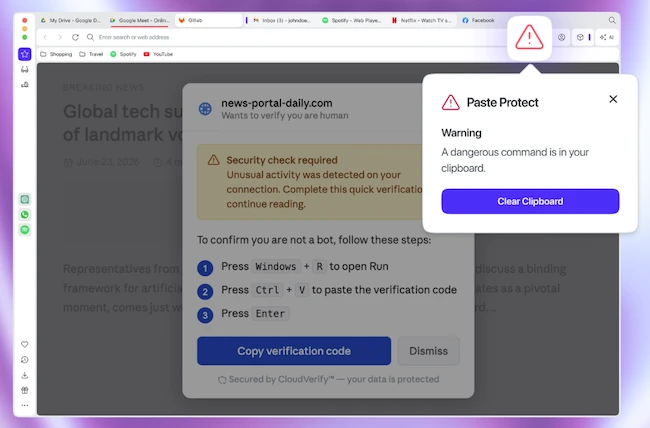
A ClickFix-style attack usually starts with something small and ordinary: a video that won’t play, or a CAPTCHA that won’t quite verify you’re human. A pop-up offers a fix, telling you to copy a short command and paste it into your computer’s terminal. It looks like routine troubleshooting. In reality, that command can install malware, steal saved passwords, or hand an attacker remote access to your machine, all carried out by the user’s own hands, on their own device.
What makes ClickFix so effective is that it sidesteps most existing defences entirely. Antivirus software and email filters are built to catch threats arriving from outside, not commands a user types or pastes in themselves. According to cybersecurity firm Huntress, ClickFix now accounts for over 53% of this kind of malicious activity.
“ClickFix attacks succeed because they turn the user into the weapon,” said Pawel Kurzelewski, Head of Security at Opera. “The clipboard is the last point before a malicious command is run, so that’s where we built our defense. With Paste Protect, we’re stopping these attacks at the exact moment they would normally succeed.”
“Opera had already been protecting users from paste hijacking for half a decade – it made sense to expand that protection to address one of the most increasingly serious online threats,” said Mohamed Salah, Senior Director of Product at Opera. “Paste Protect gives your browser a robust early warning system that can alert less experienced users while still enabling more control for more tech-savvy users or developers.”
Paste Protect combines Opera’s existing Hijack Protection feature with a new Injection Protection component. Hijack Protection prevents external applications from replacing clipboard contents with malicious data, such as a different bank account number or cryptocurrency wallet address, without the user’s knowledge.
The new Injection Protection monitors clipboard activity in real time for potentially malicious commands copied by the user or placed on the clipboard by a website. It uses detection techniques tailored to Windows, macOS, and Linux to identify patterns associated with malicious scripts.
If it detects a threat, the copy action is blocked immediately, a warning explains what happened, and a red icon appears in the address bar. Users can view the first 120 characters of the blocked content, while developers working with trusted sources can override the block or mark specific websites as safe.
