
Mastodon 4.6 adds profile Collections and two-factor controls
People who run accounts on the open source social network Mastodon can now group profiles together and share those groups across the web. The 4.6 release centers on a feature called Collections, along with reworked profiles, email newsletters, server administration controls, and a set of accessibility changes.
Server controls
The release gives server administrators a control to require two-factor authentication on member accounts. Jerry, the administrator of infosec.exchange, plans to turn the requirement on and has told members the change is coming. The same requirement will apply across the servers he runs, which include infosec.exchange, infosec.space, ioc.exchange, and convo.casa.
Collections
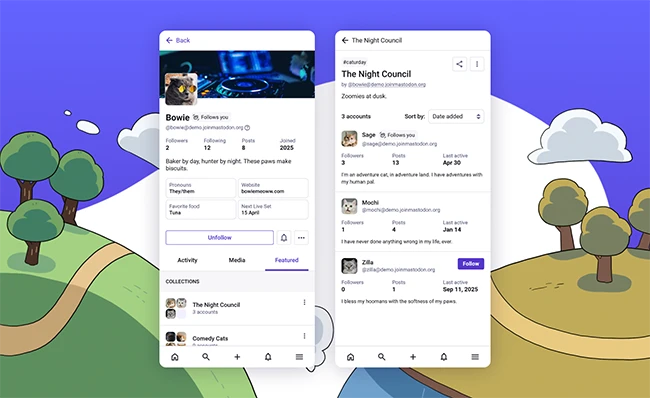
Collections let a user assemble curated lists of profiles and share them by link, on Mastodon, or anywhere online. Each user controls which collections their own profile appears in. Inclusion depends on the “Feature me in discovery experiences” preference, and an account without that preference enabled cannot be added to any collection. An opted-in user receives a notification each time they are added and can remove themselves from a given collection at any time.
The design carries several limits aimed at reducing spam and abuse. A single collection holds a maximum of 25 profiles, and there is no “follow all” shortcut. The Mastodon team set the cap because high volume makes a collection harder to review and easier to fill with spam accounts hidden among legitimate ones. When a collection owner changes a title or description, everyone listed in it gets notified.
“Once you have created a collection, you can send the link to your friend or share it anywhere on the web, including Mastodon itself. Your collections will also be available on your own Mastodon profile, under the Featured tab. If you update the title or description of your collection later, the profiles that are on it will be notified, so no funny business! For now, finding collections is very manual, primarily through word of mouth. In the future, we are planning to introduce some ways to browse and discover popular collections,” the Mastodon team said.
Profiles and editing
Profiles received a redesign based on a community survey about which user information matters most. Viewers can set a preference for seeing original posts only or seeing boosts and replies, and that preference now carries across every profile they visit. Featured hashtags sit in a more prominent position.
Profile editing moved directly onto the profile itself. A user switches the profile into an editing mode and updates the picture, header, and other details in place, with cropping handled on the spot. Alt text can now be added for profile pictures and headers, which improves access for blind and visually impaired users.
New options give users control over which tabs display. A person can decide whether a “Media” tab appears and whether it includes attachments from replies, which supports using the tab as a portfolio. The “Featured” tab that shows collections and featured profiles can also be turned off.
Newsletters and landing pages
Server operators can enable an email subscription option that lets anonymous visitors follow a user’s posts by email, reaching readers who have no Fediverse account. The feature requires an assigned role with the right permission and server-level activation. The team kept it off by default because sending email can add to server operating costs.
A new landing page variant targets institutional servers such as those of the European Commission and the German government. It highlights the server description and recent updates from local profiles and uses a simplified interface.
