
ChatGPT’s new feature could give infostealers a map of your Mac activity
OpenAI’s new Computer History feature turns recent Mac computer activity into memories ChatGPT and Codex can use, and it’s raising questions about privacy and security along the way.
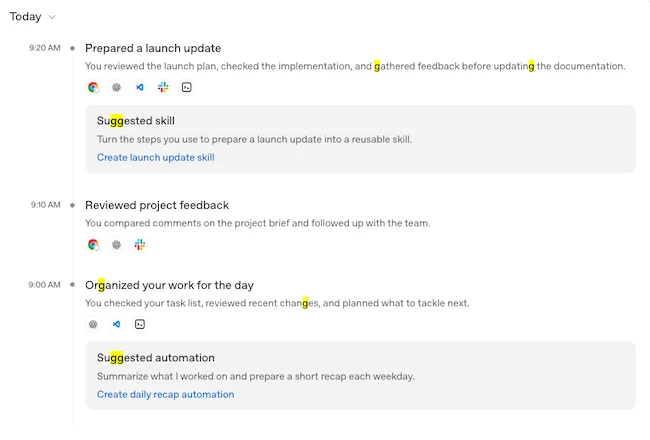
Computer History (Source: OpenAI)
What Computer History does
Computer History builds a timeline out of everyday computer use, grouping activity into summaries and noting which apps and websites contributed to each one.
“Computer History replaces the earlier Chronicle research preview, but it is a rebuilt system rather than a rename. It uses interaction events, along with text and other context available through macOS accessibility features, to create summaries you can review and delete,” the company wrote.
“It does not include screenshots in your history or record audio, and private-mode web browsing activity is never included.”
The feature is off by default and opt-in. It requires OpenAI’s separate Memories feature to be turned on, since Computer History needs that context to work across chats. Pro users can switch it on for themselves. Business and Enterprise users need administrator approval before they can opt in individually, and approval alone doesn’t turn the feature on for anyone.
It’s also unavailable in the European Economic Area, Switzerland, and the United Kingdom, and currently only works through the ChatGPT desktop app on macOS.
Users choose which apps and websites can contribute, and can exclude specific ones at any point. A pause button in the settings and the macOS menu bar stops collection without disabling the feature entirely. History can be cleared by the last ten minutes, hour, day, or in whole, and each timeline entry’s memory file can be revealed in Finder.
OpenAI says raw interaction-event files stay on the Mac, isolated inside the ChatGPT app’s own data container, and are deleted after 48 hours. The memory files generated from those events, plain-text Markdown documents, remain until a person deletes them.
According to OpenAI, the same event files are processed on its servers only to build the summaries and are not kept afterward.
The privacy risks behind Computer History
OpenAI flags two risks itself. The memory files are not encrypted, so other programs running under the same macOS user account may be able to read them. And feeding a model this much running context raises the chance of prompt injection.
“For example, if you visit a website containing malicious instructions, ChatGPT or Codex might follow those instructions,” they warned.
Ed Gaile, Principal Solution Architect at Appfire, shared his view with Help Net Security on this new feature:
“Would you let a coworker sit next to you all day, write down every click and keystroke, and keep the notes in a folder on your Mac? That is the picture I get when I read about OpenAI’s Computer History. Not a villain origin story. Just a very literal description of what the feature does.”
“If you would have to defend that log in a room, a client memo, a personnel note, a spreadsheet with real numbers, I would not turn it on for the work computer,” added Gaile.
And his advice for anyone tempted to try it anyway: “Leave it off on the work Mac. If you want to try it, use a personal machine with nothing you would have to explain later. Do not turn it on just because it shipped.”
Mark Beare, head of Malwarebytes’ consumer security unit and Malwarebytes Labs, warns that these files could give infostealers a ready-made map of someone’s workday.
