
How IT can delegate password management without losing control
IT is expected to secure company accounts, but it doesn’t always control how they’re created or shared. Departments manage their own tools and grant access to colleagues or contractors, often without involving IT. This leaves IT responsible for accounts it may not even know about.
Consider a hypothetical marketing account purchased by a department, used by several colleagues and an external agency, and tied to an employee’s recovery email. When a personnel change occurs, the organization may find itself in a precarious situation where access is unclear, leaving critical business operations at risk.
Managing passwords across departments requires shared responsibility. Business owners identify the accounts their teams rely on, approve access, and review it regularly. IT and security teams provide controls and oversight, while HR and managers initiate and verify access changes.
Map the accounts and name their owners
To establish accountability, organizations should start by identifying work accounts and assigning responsibility for each. Department leads should work with procurement and finance to identify purchased applications and vendor relationships. IT can then help verify how these accounts are accessed and who has access to them.
The inventory should identify each service, its business owner, and a backup administrator. It should also record who has access, whether the account is named or shared, and how access can be recovered. Include any access dependencies and the dates of the last and next reviews.
Keep passwords and recovery codes out of the inventory.
For accounts such as payroll portals or marketing tools, the business owner and technical administrator may be different people. The business owner decides who needs access, while the technical administrator manages it. This distinction matters when access reviews are overdue or ownership changes.
Define what each team can decide
Business owners decide who needs access to their team’s accounts. They approve requests and review permissions regularly. IT sets security policies and provides the tools to enforce them.
Day-to-day access management can be delegated to designated employees within departments.
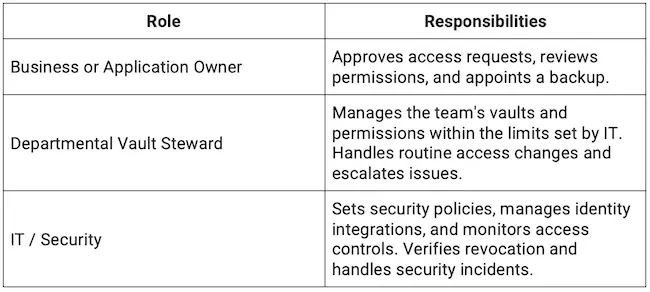
HR and managers notify the responsible teams when employees join, change roles, or leave. Procurement helps identify new applications and vendor relationships.
Make secure access part of daily work
Security rules work best when they fit into how teams already operate. Employees should have a clear way to request access, share credentials, and hand over accounts when roles change.
- Start with individual accounts and single sign-on (SSO) wherever possible. Use phishing-resistant multi-factor authentication (MFA) where appropriate. For applications that don’t support SSO or require shared logins, provide an approved password vault instead of leaving teams to exchange credentials through email or chat.
- Make access requests part of the regular workflow. Business owners approve requests, while IT grants access through the approved system. When employees change roles or leave, managers notify IT so permissions can be updated or revoked.
- Give contractors access with a defined end date and an internal sponsor responsible for reviewing it. Assign an owner and backup for shared accounts, including their recovery procedures. Test emergency access before it’s needed.
- Use vault activity logs to review credential access, but remember that they may not show what users do inside the applications themselves.
How Passwork helps IT delegate password management
Passwork, a password and secrets manager for businesses, lets IT set security rules while departments handle everyday access decisions.
IT can create separate vaults for departments or projects and configure vault types with designated administrators. For example, a sales manager can manage permissions within the team’s vaults, while corporate administrators retain oversight.
Roles and access levels help limit what employees can do. Teams can share individual passwords without exposing entire vaults, including through one-time or time-limited links for external recipients.
AD/LDAP synchronization helps keep Passwork groups aligned with directory groups as employees join, move, or leave. SSO centralizes sign-in, while activity logs and the security dashboard give IT visibility into password management.
This way, departments can manage access to their own accounts within the boundaries set by IT.
Close the gap when someone changes roles or leaves
When an employee changes roles or leaves, HR, IT, and the business owner need to coordinate access changes. Each step should have an owner, and the results must be verified.
- HR or the manager records when access should change and notifies IT and the business owner.
- IT disables the employee’s identity and vault access, removes group memberships, and checks application-specific accounts. Active sessions and tokens should also be revoked where possible, since disabling an identity may leave existing sessions active.
- The business owner identifies shared credentials the employee could access. Once their access is blocked, passwords should be changed in the affected services and vault records updated.
- The responsible account owners transfer account ownership and recovery methods. They also review vendor and agency access, assign owners to service accounts or integrations where needed, and replace affected tokens without disrupting active services.
- IT and the business owner verify that access changes have taken effect and document any exceptions.
CIS Safeguards 6.1 and 6.2 call for documented processes to grant and revoke access. These processes still need to be implemented and verified across the systems involved.
Test the process with one team before scaling
Start with one department and a small set of critical accounts. Choose a team willing to participate and find out how employees currently request, retrieve, and share access. Pay particular attention to what happens when someone is absent or leaves.
- Assign a business owner and an IT contact for each account. Build the inventory, configure permissions, and move approved work credentials into the vault. Keep personal passwords out of the corporate system.
- Test the process with real scenarios. Can a new employee get the access they need? Can a manager approve a request? Can IT revoke access without disrupting the team’s work? Check account recovery as well, including what happens when the primary owner is unavailable.
- Change passwords after migration. Credentials that lived in chats and browsers should be considered exposed. Once the migration is verified, change passwords for the imported accounts, starting with business-critical ones and those shared with contractors or former employees. Update the vault records as you go.
- Treat temporary exports as sensitive data and restrict access to them. Once migration is verified and retention requirements allow, retire old sharing methods. Show employees how to use the new process and give them a support contact. Document exceptions for applications that don’t support SSO or individual accounts.
Expand to other departments once access and recovery issues are resolved. Use the pilot results to plan the next rollout rather than committing to a fixed deployment timeline.
Measure ownership and access, not software installs
Installing a password manager doesn’t mean every account is under control. Track whether teams have assigned owners, review access on time, and complete offboarding procedures.
Start with four metrics:
- Owner coverage: Percentage of accounts with a named business owner and backup.
- Review completion: Percentage of access reviews completed on time.
- Leaver closure: Percentage of employee departures with confirmed access removal, downstream checks, and required shared-password changes.
- Unowned or overdue items: Number of accounts without an owner or with overdue reviews, broken down by department and how long they’ve been outstanding.
Define who tracks each metric, where the data comes from, and how often it’s reviewed. Record exceptions and report both the number of completed cases and the total number in scope. An incomplete account inventory can make coverage appear better than it is.
Start with one team
Start with one team and a few business-critical accounts. Help the team identify account owners, agree on access rules, and establish a process for reviewing and revoking access. Test the process together before expanding it to other departments.
The goal is to give business teams responsibility for the accounts they use, while IT provides the tools and controls to keep access secure.
If you’re planning to extend secure password management across your organization, take advantage of Passwork’s Black Friday offer. Get up to 67% off and choose a gift: a free upgrade to 5,000 user seats or 25% off your first renewal.