
WSL containers now build and run Linux workloads on Windows
Containers power a large share of cloud-native applications, AI workloads, and testing and deployment pipelines. Developers working on Windows have long pulled in third-party software to build and run them. That step becomes optional with WSL containers, a feature that arrived at Microsoft Build 2026 and reached public preview in the pre-release version of the Windows Subsystem for Linux, build 2.9.3. Installation runs through wsl --update --pre-release or a direct download from GitHub.
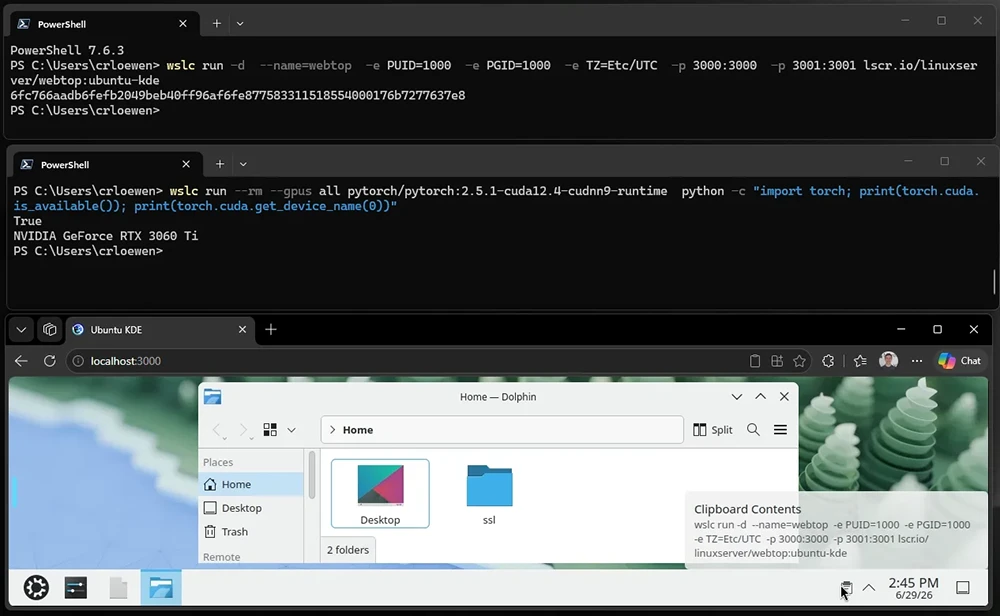
WSL containers add two pieces to WSL. The first is a Linux container command-line tool, wslc.exe, which lands on the path after an update. It carries a familiar format, so existing container commands work with the same muscle memory. A developer can start a Linux desktop in a container, run a CUDA script to confirm GPU access, and handle building, debugging, and testing through the same binary. An alias named container.exe maps to wslc.exe, so either command works.
The second piece is an API that lets Windows applications run Linux containers as part of their own logic. WSL ships a NuGet package on nuget.org and on the WSL releases page, with support for C, C++, and C#. Native Windows applications can reuse existing Linux code, bring cloud applications down to a local machine, and confine a Linux process’s access to host resources. The API connects to MSBuild and CMake, so a few lines in a project file fold the container build and deploy steps into an application’s own build. A session at Build 2026 walks through the use cases, and Microsoft’s documentation covers guides and sample code.
Enterprise tooling extends to the new feature. The existing Microsoft Defender for Endpoint plugin for WSL now reads Linux container events, giving the same coverage across distributions and containers. That coverage sits in a private preview with a sign-up form open to interested teams.
Administrators gain management settings through Intune. The controls cover whether people in an organization can use WSL distributions or containers, and they include an allowlist of container registries permitted to supply images. A frequent customer request drove part of the design: “How can I control which distros/Linux images are allowed in my organization?” The registry allowlist answers it. The settings work now through GPO and an ADMX policy, with official support in Intune dashboards expected within a few weeks.
VS Code dev containers gained wslc support in release 0.462.0-pre-release. The setup needs one change: open the dev container settings, find the Docker Path field, and set it to wslc. General availability for that path is on the way.
Lower-level work underpins the feature. A new default file system for WSL containers, virtiofs, makes Windows file access twice as fast. A new default networking mode, consomme, relays Linux network traffic through Windows so Linux applications inherit the host’s networking environment, security policies, and enterprise integrations. Memory reclaim improvements return unused memory to the Windows host on a steady schedule, releasing it once the Linux VM stops needing it.
These changes touch file system access and networking, so they run in WSL containers for the present, with broader rollout to WSL planned for the future. Container tools that build on WSL, among them Docker Desktop, Podman Desktop, and Rancher Desktop, draw on the same platform work, which gives Windows users a range of performant options.
The feature sits in the pre-release channel as a public preview, and Microsoft aims for general availability in the fall of 2026.
