
Secure your containers without breaking what works
Container security has a familiar problem. Teams identify vulnerabilities, but turning those findings into lower risk is much harder. A standard container image may include operating-system packages, development tools, debugging utilities and libraries that an application never uses. Each unnecessary component can expand the attack surface and add vulnerabilities to investigate, patch or explain during an audit.
Consider an NGINX image that contains 274 categorized vulnerabilities straight from download. Scanning makes those findings visible, but a list of findings does not tell a team which components the workload actually executes. It also does not provide a safe way to remove them. The real security opportunity is not simply to flag more issues; it is to reduce what ships in the image without disrupting the application.
For years, teams have approached this challenge manually. Developers inspect images and make judgment calls about which packages, libraries or tools appear unnecessary. That approach is difficult to scale, hard to reproduce when people change roles, and risky when an image reaches production. A component that looks unused in a static review may be needed under load, during an unusual transaction, or in a less frequently exercised application path. If the image breaks after release, the cost of that outage can outweigh the benefit of removing a few packages.
From vulnerability scans to runtime evidence
The answer is to replace guesswork with behavior-aware hardening. The guiding principle is straightforward. What is installed is not necessarily what is executed. Static analysis and a software bill of materials (SBOM) describe what is present in an image. Runtime observation adds a different perspective in identifying what components are actually used when the workload runs.
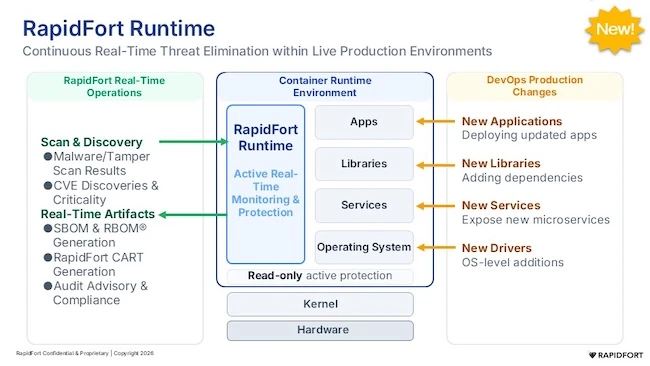
That distinction is the basis for a runtime bill of materials (RBOM). An RBOM records the software components observed in use by an instrumented container. Viewed alongside the SBOM, it helps teams distinguish the full inventory of installed components from the subset seen in execution. Both views matter. The SBOM is useful for inventory and compliance needs, while the RBOM helps inform decisions about hardening based on observed behavior.
How to harden container images in three steps
A repeatable hardening process has the following three stages – profile, harden and validate:
First, profile the workload under representative conditions. That means going beyond a simple “happy path” test to include functional test suites, staging traffic, production usage where appropriate, load and stress testing, and fuzzing. The objective is to capture a credible baseline of what the application loads, which binaries it executes, the configurations it uses, and the network calls it makes. The quality of this baseline directly impacts the quality of the resulting image.
Second, use the baseline to guide removal. An execution-path map provides evidence for deciding which components were not observed during profiling. Teams can choose the intensity of removal to match the service and its risk profile. A standard approach removes components not observed in execution, a more conservative approach focuses on unused packages with known vulnerabilities, and a more aggressive approach may suit lower-risk internal services that can tolerate more extensive reduction. An explicit keep or override list is also important for allowing teams to preserve components when there is a valid reason to do so.
Third, validate the hardened image before promoting it. Rerun functional and integration tests, compare results with the original image, and retain the original as a rollback option. Validation should be a release gate, not an optional final check. If the hardened image fails, it should not move forward until the failure is understood and resolved. Findings from validation should also feed the next profiling baseline so the process improves over time.
The potential gains of a repeatable hardening process can be meaningful. Removing unnecessary components can reduce both exposure and operational overhead without changing application source code or logic.
Automating container hardening in CI/CD
And automation makes the process repeatable at scale. Profiling, execution-path capture, image regeneration, validation and drift detection can be integrated into CI/CD systems such as GitHub Actions, GitLab CI or Jenkins. When a new build begins using a component that was not previously observed, or a previously used component disappears, the pipeline can flag the change for review. A fleet-level dashboard can then show which images have been hardened, what remains, and which decisions were made.
Automation, however, should not eliminate human accountability. Security and engineering teams still need to choose removal intensity, manage exceptions, investigate failed validation, and approve compliance-sensitive releases. A single preset is unlikely to fit every service. An externally exposed service may call for a more conservative, auditable approach, while an internal service may allow more aggressive reduction. Context and sign-off remain essential.
Container hardening is not a one-time cleanup. Images change as packages and dependencies evolve, so the baseline and validation process must be repeated with each relevant build. Organizations can begin by selecting one service, measuring its image before and after hardening, and confirming that the required functionality remains intact. The larger lesson is that security improves when teams reduce unnecessary software through evidence-based, continuously validated steps. This is a much more meaningful approach than merely accumulating vulnerability reports. Secure images should contain what the workload needs, and no more than the process can safely justify.