
Open-source privacy tool BleachBit 6.0.0 upgrades code signing across Windows and Linux
System cleaning utilities have grown more relevant as web browsers stockpile larger volumes of cached data, tracking artifacts, and site storage on local disks. The open-source utility BleachBit moved into a new major version on with a 6.0.0 release that targets that buildup. The update contains more than 100 changes covering browser cleaners, the command-line interface, secure deletion, and platform-specific fixes for Windows and Linux.
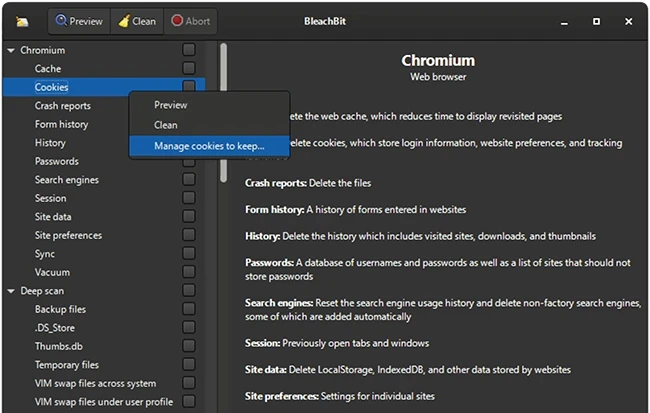
Cookie manager and broader browser coverage
A new cookie manager lets users select which cookies to retain when cleaning Chromium-based and Firefox-based browsers. The feature addresses a long-standing gap for users who want to purge tracking data without losing logins to specific sites.
Cleaners for the Vivaldi and Zen browsers join the supported list. Chromium-based browsers, including Google Chrome, now have additional artifacts cleaned: component cache, extension cache, Graphite Dawn cache, shader cache, DIPS, crash reports, code cache, media device salts, reporting data, IndexedDB, network state, and search suggestions. Firefox, LibreWolf, and Waterfox cleaning expands to cover storage, permissions, bounce tracking protection, site security state, alternate services, favicons, and session backups. Opera cleaning received major improvements, and cache handling improved for snap and Flatpak installations across Chromium and Firefox families. Browser options for both engines have been reorganized under a “Site data” category.
Expert mode and interface changes
A new expert mode introduces guardrails for less experienced users by restricting advanced operations. Users upgrading from versions older than 5.1.0 may need to enable expert mode to access features that previously had no guardrails. The setting controls access to options that can produce data loss, such as deleting browser passwords, with warning icons appearing in the tree view when expert mode is off.
Terminology shifted across the interface. The previous “whitelist” terminology became “allowlist,” and “overwrite free space” became “wipe empty space” with an elaborated warning. Info bars replaced modal alert dialogs in several places. The System Information dialog gained a button to anonymize data before sharing, and the dark theme received contrast improvements for error log text.
Command line and shredding updates
The command-line interface gained negation support, documented in the project’s CLI documentation. Users can press Ctrl+V in the main window to paste file paths from the clipboard for shredding, supporting plain text paths copied from applications like Notepad. The chaff feature, which generates decoy data, now runs faster and supports flexible stop conditions based on file count, total size, or free space percentage. The interface no longer freezes during chaff data downloads.
Windows and Linux platform changes
On Windows, the installer and application now use the RFC 3161 timestamp protocol with SHA-256, replacing the older Authenticode protocol that used SHA-1. The release fixes an issue where BleachBit would follow directory junctions and symlinks in the Recycle Bin, which the project flagged as an important fix that prevents unintended data loss. LibreOffice version 4 cleaning is supported on Windows, and the installer is now localized. Bundled libraries were updated to Python 3.12 and GTK 3.24.51.
On Linux, Flatpak installations of ungoogled Chromium and Chromium can be cleaned. Partition wiping calls fstrim when available for more thorough SSD cleaning. The release adds packages for Ubuntu 25.10, Ubuntu 26.04, and Linux Mint 22.3. Debian and RPM packages are now signed directly with the maintainer’s key, giving users three verification paths: direct package signature, detached signature, or signed checksum file.
Roadmap
BleachBit remains licensed under GPLv3 and runs on Windows and Linux. Get it here.
Lead developer Andrew Ziem stated a major overhaul of the graphical user interface is in progress, along with backported fixes for BleachBit 4.6.3 covering Windows XP and Windows 7.

Read more: 25 open-source cybersecurity tools that don’t care about your budget
