
Attackers are using Microsoft’s legitimate login system to camouflage phishing attacks
Attackers are moving away from fake Microsoft login pages in favor of abusing Microsoft’s own authentication system, letting phishing campaigns slip past the warning signs employees are trained to spot, according to Check Point.
Between June 25 and the second week of July, researchers found over 200 phishing emails targeting around 120 organizations in a wide range of industries and countries.
The email masquerades as a Microsoft Planner task-assignment notification, claiming that HR has shared payroll and benefits updates while displaying several overdue employee tasks to create a sense of urgency and encourage recipients to click the embedded links.
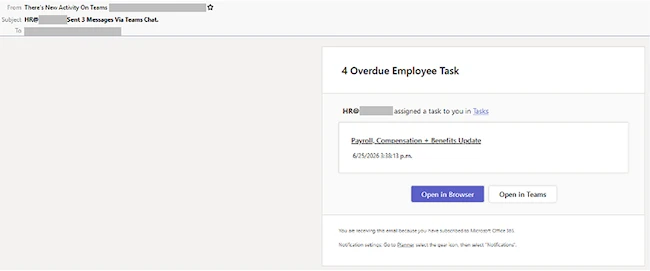
Fake Microsoft Planner task-assignment notification (Source: Check Point)
“Every link in the message, including both call-to-action buttons, leads through the same redirect. The visible sender address also belongs to the target’s own organization, meaning the email is sent to the same person it appears to come from,” Check Point explained.
How the attack works
Once the user clicks the link, they are taken to a genuine login.microsoftonline.com OAuth authorization page, so the URL itself does not raise suspicion. After signing in, the user is presented with a permissions request asking them to approve access for themselves or their organization. If they agree, Microsoft redirects the browser to the address registered by the application.
In this campaign, that redirect points to an AWS API Gateway endpoint controlled by the attackers rather than Microsoft, the researchers said.
The endpoint receives an authorization token that the attackers can exchange for access to the victim’s account. The level of access they gain depends on the permissions the user approved.
Check Point warned that the technique is already common and becoming increasingly widespread.
“It is a named and tracked technique in the MITRE ATT&CK framework, and in 2026 it evolved from a targeted, manually built attack into a service that virtually anyone can rent.”
Depending on what the victim clicked approve on, an attacker-controlled app can reach into the victim’s entire Microsoft 365 environment, including email, files, Teams chats, SharePoint, OneDrive, and calendar data.
Check Point advises hovering over links before clicking, and treating it as a warning sign if several buttons in one email lead to the same URL. It also recommends checking whether the sender name, address, and domain line up, since display names can be spoofed even when the address looks internal.
“The campaign is no longer active, but it’s yet another example of how attackers have fundamentally changed how they’re bypassing traditional phishing defenses,” researchers concluded.
