How attackers turned a Teams meeting booking into a device code phishing trap
Attackers used a fake Microsoft Teams meeting scheduler to trick an employee at a construction company into approving a device code sign-in. They got a valid session token before Huntress’s security operations center identified the incident.
Device code phishing abuses a real Microsoft sign-in flow. The attacker starts a sign-in, gets a short code back, and persuades the victim to type it into Microsoft’s genuine device login page. The victim enters the code, completes MFA if prompted, and without knowing it approves the attacker’s session. That approval hands the attacker access tokens for the victim’s account.
The booking reference was the code
The email came from a typosquatted domain impersonating a real senior vice president at another construction firm. Its link went to a Google share link, which redirected to the lure page. The attacker’s domain never appeared in the email body, so the message got past URL reputation checks.
The lure page looked like a Teams scheduler. It showed the executive’s headshot and offered an introductory call about a long-term supply partnership. Clicking “Continue” started a Microsoft device code request on the attacker’s backend. The next page showed the resulting code as a “Booking Reference,” with a countdown timer to hurry things along.
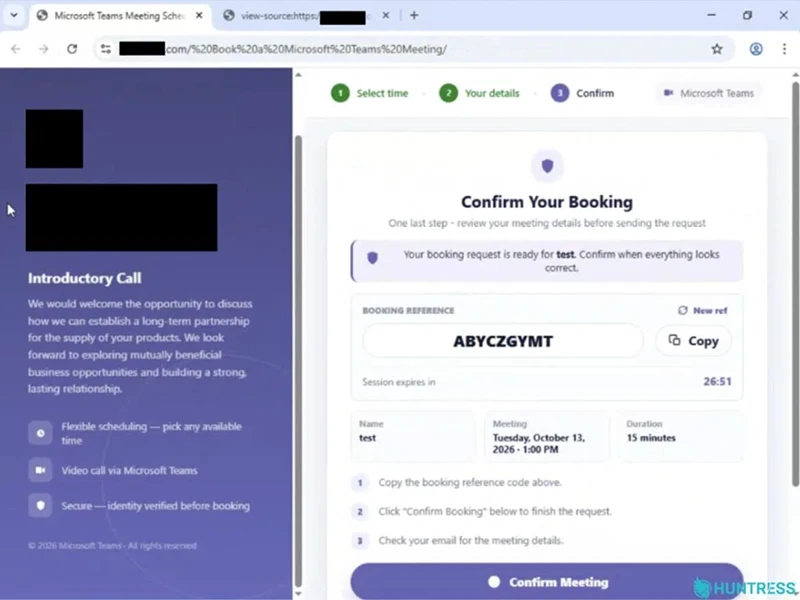
Lure confirmation page (Source: Huntress)
Clicking “Copy” or the confirm button copied the code to the clipboard and opened a popup to Microsoft’s real sign-in page. When the attacker’s backend registered a successful sign-in, the page closed the popup, showed a “Verification complete” note and sent the victim to a Calendly booking page so nothing looked out of place.
Built to beat scanners and MFA errors
The phishing kit arrived as AES-256-GCM ciphertext, with the decryption key sitting next to it in the same page. That setup targets email scanners and crawlers that don’t run JavaScript. To them, the lure page is an encrypted blob.
The kit also had fallbacks. If Microsoft returned an error, which can happen when MFA is required, the page told the victim a new verification code was being prepared. It then started a fresh device code session and tried again. The attacker sent the final login through a residential proxy in New Orleans so it looked like consumer traffic.
What to lock down
Huntress advises treating unexpected device code prompts as suspicious. Where the business doesn’t need device code authentication, restrict or monitor it through conditional access. Huntress also recommends phishing-resistant MFA and a close look at unfamiliar device sign-ins.
If programmatic user agents such as python-requests or node show up in interactive sign-in logs, that points to automated attacker infrastructure. After a confirmed compromise, check for rogue MFA methods, unknown registered devices, unauthorized app consents, suspicious mailbox rules and suspicious outbound mail.