
Microsoft Store updated with a new CLI, analytics, and Web Installer improvements
Microsoft has introduced new developer tools, updates to developer analytics, and a Web Installer in the Microsoft Store on Windows to help developers build and scale apps on the platform.
“The Microsoft Store on Windows continues to evolve, shaped by ongoing feedback from developers building and scaling apps on the platform. Over the past months, that feedback has guided several updates across onboarding, publishing, distribution and analytics,” Giorgio Sardo, VP, Microsoft Store, explained.
Command-line access to the Microsoft Store
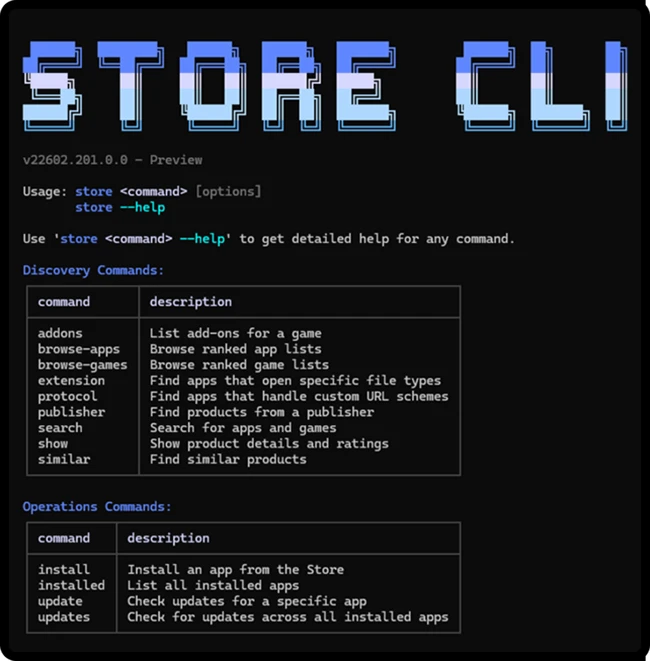
Microsoft introduced the Microsoft Store command-line interface (CLI), enabling app discovery, installation, and updates directly from the terminal.
The Store CLI is available only on devices where the Microsoft Store is enabled.
With the Store CLI, developers can search and filter the Store catalog by category, subcategory, listing type, market, and more. Using a single command, they can install apps and update specific ones from the command line.
Performance and usage analytics
To give developers insight into app performance, Microsoft enhanced Health Report, introduced Anomaly Alerts and a Summary Dashboard, and redesigned the Usage Dashboard in Partner Center.
Health Report supports multiple filters across app versions, OS builds, and device architecture, enabling analysis of stability patterns across dimensions and over time.
Anomaly Alerts notify developers, via dashboard and email, when unusual crash or hang rate patterns are detected, enabling faster investigation using Health Reports.
The new Summary Dashboard surfaces key indicators such as installs, ratings, stability, and engagement, with direct access to detailed reports in Partner Center.
The redesigned Usage Dashboard adds deeper engagement signals, including active devices, session counts, and engagement duration, with filters for region and app version.
Improved Web Installer and enterprise deployment
Microsoft enhanced the Web Installer to support more deployment scenarios and improve app delivery.
For Win32 apps, auto-open capability launches the app immediately after installation, removing the need for manual launch. Expanded enterprise device support improves installation logic, allowing more enterprise-managed devices to complete installs.
Developers can switch to the Store Web Installer by generating updated badge code and configuring the launch mode to Direct. The official badge supports consistent distribution and engagement across landing pages.
