
Threat actor impersonated hundreds of brands on GitHub to push infostealer malware
A financially motivated threat actor is impersonating hundreds of brands on GitHub and pushing a smash-and-grab infostealer masquerading as legitimate downloads of popular software, Arctic Wolf threat researchers have warned.
“The 292 impersonated repositories span security tooling, fintech and personal finance, cryptocurrency wallets and exchanges, developer and productivity tools, secure email providers, macOS utilities, and gaming software, including ‘cheat’ tools,” they said.
How the attack works
Among these repositories was one impersonating Arctic Wolf, which spurred the company to dig deeper and document the extent of the campaign.
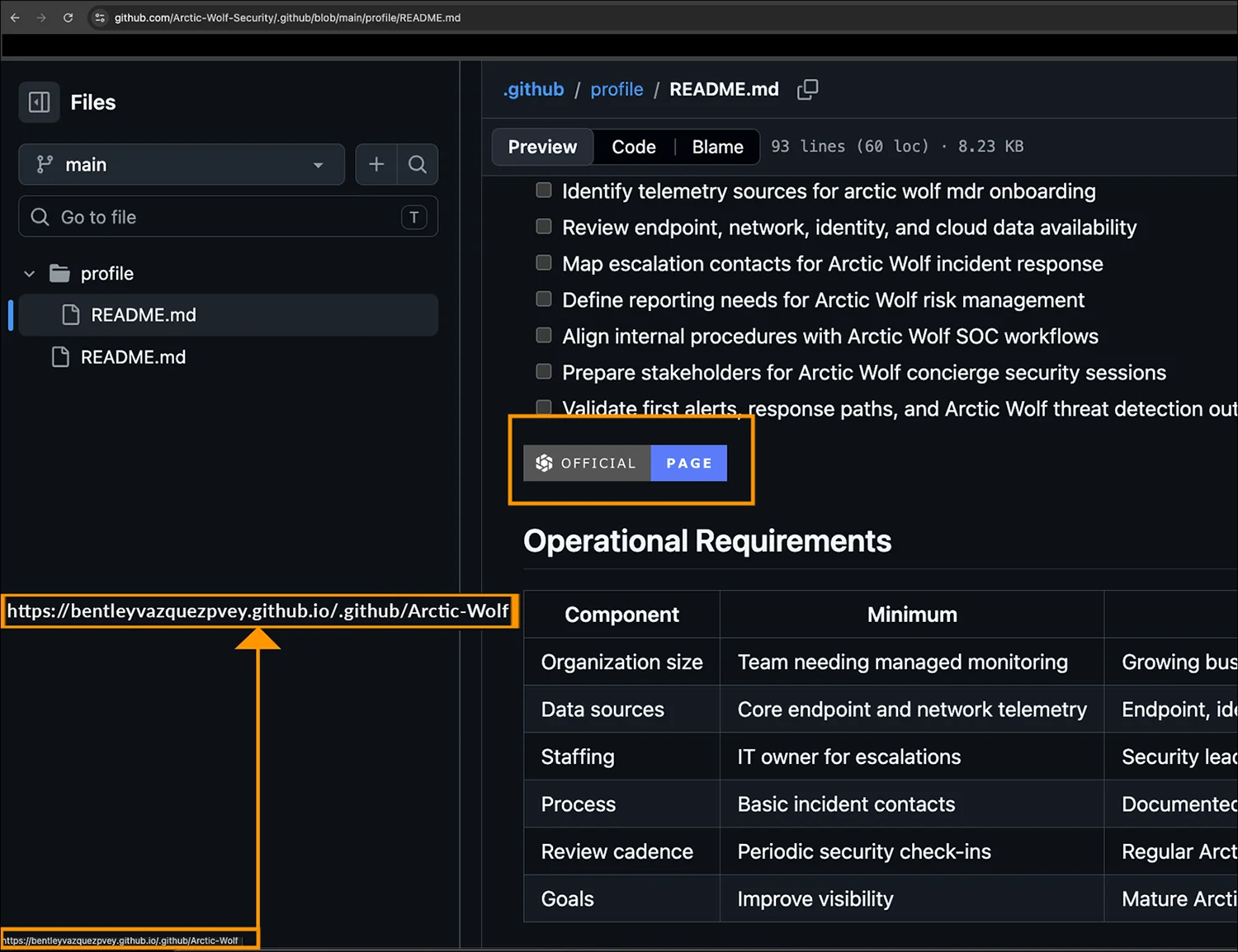
The README file on the fake Arctic Wolf Github repo (Source: Arctic Wolf)
They discovered that potential targets are directed to the GitHub pages via SEO-optimized search engine results.
“Each repository hosts a README document, with a concealed download link that routes victims through a *.github.io page and a threat-actor-controlled distribution domain to a fake ‘secure download’ page,” they explained.
“The page serves a large ZIP archive that regenerates its filename and payload roughly every 60 seconds. The archive bundles a legitimate, signed WinGUP updater (which is actually gup.exe, renamed each time to the impersonated product) and a trojanized libcurl.dll. When the user runs the executable, gup.exe side-loads libcurl.dll, which decodes and reflectively executes an embedded [Windows] infostealer entirely in memory.”
The infostealer shares its codebase with the previously documented BoryptGrab infostealing malware, features 11 modules, and is capable of collecting:
- Information about the infected system and the software installed on it
- Credentials and cookies stored by a variety of browsers, including Chrome, Edge, Brave, Yandex, Vivaldi, Chromium, Tor, Epic, Opera, Opera GX, and Firefox
- Local storage and configuration data from installed browser extensions, including a wide variety of cryptocurrency wallet extensions
- Steam session tokens, Meta Max (messenger) credentials, Discord tokens, Telegram data
- Files from the Desktop and Documents folders whose names contain words like “password,” “passwords,” “seeds,” “keys,” “wallet,” “backup,” and “recovery”
- Credentials stored in the Windows Credential Manager
All this data is exfiltrated to a C2 server hosted in Russia (hardcoded IP address: 193.143.1[.]131).
“Static analysis finds no Run key or scheduled-task registration, no Windows Defender exclusion writes, no virtual-machine (VM) or debugger detection routines, and no process name blocklisting. The implant is a pure ‘smash-and-grab’ infostealer: one execution, all data collected and exfiltrated, no foothold established,” Arctic Wolf found.
“It does, however, stage all collected data plus its own operational logs (browser_decryption.log, sends.log) to a temporary output folder and does not delete that folder afterward, leaving a recoverable forensic footprint on disk.”
Users and admins can check for the presence of the folder; if it’s there, the system has been compromised.
“Rotate credentials, browser sessions, and cryptocurrency wallet keys for any host that executed a sample; assume browser-stored passwords, cookies, wallets, Discord tokens, Steam tokens, Telegram sessions, Meta Max credentials, and Windows Credential Manager entries are fully compromised,” the researchers advised.
Reactive whack-a-mole on GitHub
The researchers have made sure to note that the impersonated vendors or brands are not at fault for any of this, as the threat actor is not exploiting a software vulnerability in their offerings.
They are abusing those vendors’ good names, and the trust users have in search engine results and in the Microsoft-owned GitHub hosting service.
The researchers believe that the attacker is using automation to register throwaway accounts and organizations. They also say that the attacker is probably not using LLMs to generate the fake download page, the README files, and to create the github.io redirector accounts.
Language and hosting artifacts related to this campaign point to a Russian-speaking operator, though they couldn’t connect it to a known threat actor or group.
The campaign started on June 26, 2026, and is still ongoing.
“We flagged the fake ‘Arctic Wolf’ page for removal and it was promptly taken down by GitHub,” the researchers noted, and said that GitHub has already removed a substantial portion of the malicious repositories they flagged.
But removal is reactive, and spinning up new accounts costs the actor nothing. Until GitHub gets better at proactively finding and removing malicious repositories impersonating popular brands, the burden falls on users and employees to verify what they download.
Arctic Wolf’s advice is to source software only from vendor-verified channels and to treat any .github profile repository with a recent creation date, sparse commit history, and marketing-style README as suspicious by default.
Spoofed trust badges and “secure download” pages are easy to fabricate and prove nothing, they added. And the single most useful rule of thumb: legitimate installers do not require running an executable out of a ZIP archive, no matter whose name is on it.
The company has shared indicators of compromise and a Yara rule for detecting malicious activity associated with this malware delivery campaign.

Subscribe to our breaking news e-mail alert to never miss out on the latest breaches, vulnerabilities and cybersecurity threats. Subscribe here!
