
Meta is overhauling how you sign in, manage settings, and protect your accounts
Meta Account gives users of Meta apps and devices a simpler way to access and manage their accounts. Accounts Center will automatically be updated to a Meta Account as part of a gradual rollout over the next year. Users will be notified when the change occurs.
It supports Meta technologies including Facebook, Instagram, Messenger, Threads, Meta AI, AI glasses, and Meta Quest headsets. WhatsApp can be added optionally. It is only included if it was previously added in Accounts Center or if the user chooses to add it later.
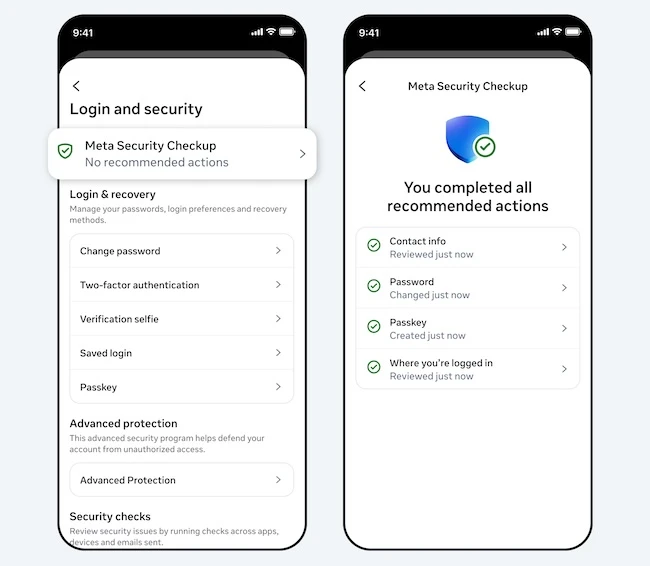
Sign-in and protection
Users can set up a single password for their apps and devices. When downloading a new Meta app or setting up a new device, creating another login or profile is not required.
“Key settings like personal details and ad preferences are located in one place with Meta Account, so you can manage what matters to you without switching between apps,” Meta said.
To protect user information, Meta Account supports passkeys on Instagram, in addition to Facebook and Messenger, with support for more apps planned. WhatsApp passkeys remain managed within WhatsApp.
It includes security systems that run continuously to detect and block suspicious activity, helping prevent unauthorized access.
Security Checkup provides personalized recommendations to strengthen protection, including MFA and login alerts.
Settings and preferences
Some settings are shared across profiles to simplify management across apps and devices.
“When needed, we’ll adjust these settings to match across your profiles and devices, if you add them to the same Meta Account that previously had different settings. For example, if you’ve chosen to “see less” ads about alcohol on Facebook and less ads about gambling on Instagram, when you add them into the same Meta Account, you’ll “see less” ads about alcohol and gambling across all profiles in that Meta Account,” the company explained.
More settings can be managed centrally, including passwords, 2FA, and the email address linked to the account. App-specific settings remain managed within each app. Controls such as who can interact with users or view content stay within the respective app and are not changed by Meta Account.
Users can keep apps separate or remove profiles from a Meta Account without creating a new account.
Parents can supervise teens’ accounts more easily through Meta Account, with tools available in a single dashboard.
