
Microsoft 365 Copilot redesign brings context and actions into one workspace
Microsoft 365 Copilot, an AI assistant that helps people write, summarize, analyze information, and complete work tasks, has been redesigned. It now serves as a single, flexible entry point to Copilot across Microsoft 365 apps, suggesting relevant actions based on the user’s work.
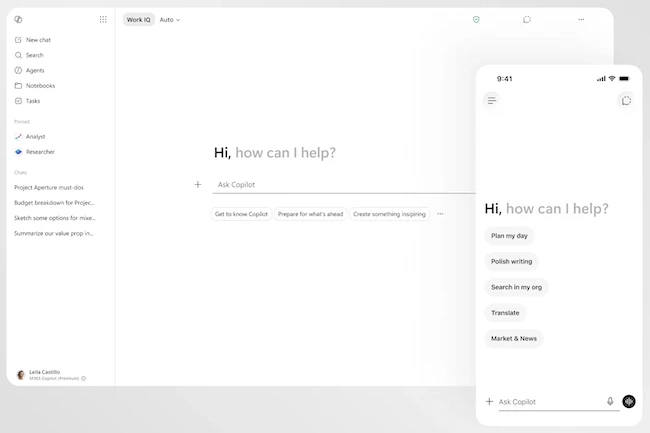
A redesigned interface built around user intent
Microsoft applied the design principle of progressive disclosure, allowing users to start with a focused interface that reveals additional capabilities as needed. The left side of the interface provides access to agents, conversations, and history.
The prompt line has become a task-aware workspace for describing tasks and goals. Copilot surfaces relevant tools and controls, suggests prompts to expand the work, and recommends follow-up actions.
The experience is powered by Work IQ, the intelligence layer that personalizes Microsoft 365 Copilot and understands context, relationships, and work patterns.
Microsoft says the redesigned app loads twice as fast and includes performance and reliability improvements.
Copilot works directly within Microsoft 365 apps
The new entry point provides access to Copilot in a side pane and directly within documents. It can suggest or make changes and can be invoked within a paragraph, cell, slide, or elsewhere on the canvas.
The experience allows users to work within their current application while Copilot takes action directly in documents, spreadsheets, presentations, and email.
Microsoft says that after rolling out the new in-app experiences, Copilot usage increased by 27% in Word, 33% in Excel, 43% in PowerPoint, and 30% in Outlook.
“These updates are more than a refreshed interface. They’re a broader shift in how we design AI for work. We’re moving from individual features to connected experiences. From adding capabilities to shaping outcomes. From asking people to adapt to technology, to shaping technology around how people actually work,” Jon Friedman, Chief Design Officer for Microsoft 365, explained.
