
Fake CAPTCHAs are tricking users into running malware on their own devices
Fake CAPTCHA checks are being used to do more than hide phishing pages. Attackers are turning the familiar “prove you’re human” step into a gateway for malware downloads, malicious browser notifications, and commands that victims are tricked into running themselves, according to Barracuda.
The company found CAPTCHA abuse in 43% of the phishing-kit attacks it examined during 2025. These checks help attackers gain users’ trust, filter visitors, and conceal malicious content from automated security tools.
How the trap works
An attack may begin with an email asking the recipient to review a document, invoice, contract, or file. The link opens a CAPTCHA page that presents verification as a requirement for accessing the content.
Completing the check may lead to a counterfeit Microsoft 365 login page designed to steal credentials. Other campaigns trigger malware downloads or ask users to enable browser notifications, allowing attackers to send further malicious content.
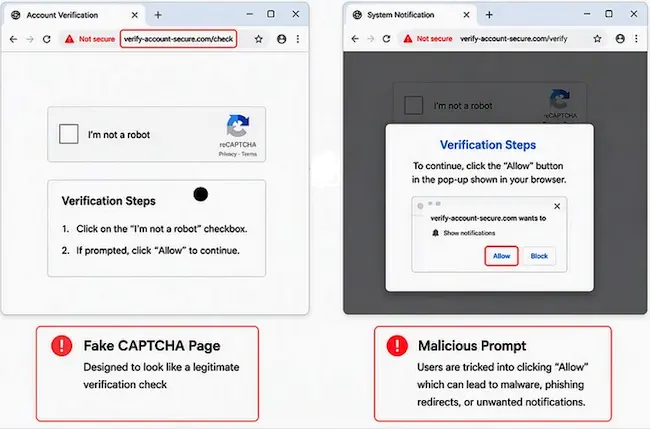
Example of fake CAPTCHAs (Source: Barracuda)
CAPTCHA challenges can also prevent automated scanners and security testing tools from reaching the next page, limiting inspection of the attack.
“The pages may also adapt according to a visitor’s device, location, activity, or timing. Some appear only briefly or expire after being viewed, making them more difficult for security teams to investigate after an incident,” Poojitha B, a Threat Analysis Associate at Barracuda, explained.
Tricking users into running commands
Fake CAPTCHA pages also feature in ClickFix attacks, which persuade people to execute malicious commands under the guise of completing verification or fixing a problem.
Clicking a checkbox or “Verify” button may copy a command to the clipboard without the user’s knowledge. The page then instructs the person to open the Windows Run dialog or another system tool, paste the text, and press Enter. Running the command starts the malware infection.
Barracuda said some variants copy commands following a webpage interaction or mouse movement. The attacker then relies on instructions to get the victim to execute the copied content.
These pages may imitate browser errors, failed document previews, meeting problems, or software-update notices. The accompanying recovery instructions guide users through the actions needed to launch the attack.
Using familiar brands to build trust
AI and no-code development tools help attackers create CAPTCHA pages, login screens, and phishing sequences. Pages can incorporate the recipient’s details or their organization’s branding, with language and content adapted to the target.
Some campaigns impersonate several services in sequence. A document-sharing message may lead to a CAPTCHA, an Adobe-style prompt, and a Microsoft sign-in page. The sequence resembles a workplace process, encouraging users to enter their credentials.
Warning signs to watch for
Requests to run commands, install software, enable browser notifications, or provide passwords and one-time passcodes are warning signs of a fake CAPTCHA. Unexpected downloads and threats of account suspension or data loss should also prompt users to stop.
The company advises checking website addresses for misspelled domains, unusual subdomains, and addresses unrelated to the service being presented. Users should verify the website’s identity before following instructions or entering sensitive information.
