Windows settings backup is on by default starting with Windows 11 26H2
Starting with Windows 11, version 26H2, Windows settings backup will switch on by default on eligible devices. The company renamed the feature, which launched in August 2025 as Windows Backup for Organizations, and moved the management of roaming settings into the same policy tools.
What gets saved
The feature backs up supported Windows settings and the list of installed Microsoft Store apps. When restore is available, users can select a backup profile to recover their settings and app list on a new, reset, or reimaged PC.
Soon after the launch, Microsoft added first sign-in restore, extending support to more device types and hybrid-managed environments.
Four changes
IT teams can keep their existing policy settings, Cloud Solution Providers, and Group Policy paths. The rename requires no policy migration or reconfiguration.
Enterprise State Roaming (ESR) lets supported Windows settings follow users across devices associated with their Microsoft Entra ID accounts. Since the transition period ended in June 2026, administrators have managed ESR through Windows settings backup and restore policies. The same settings remain supported, and applicable licensing requirements still apply.
Windows continues to honor policies that explicitly enable or disable backup. Organizations that want to keep backup off can explicitly disable it by policy. Administrators still need to configure restore separately.
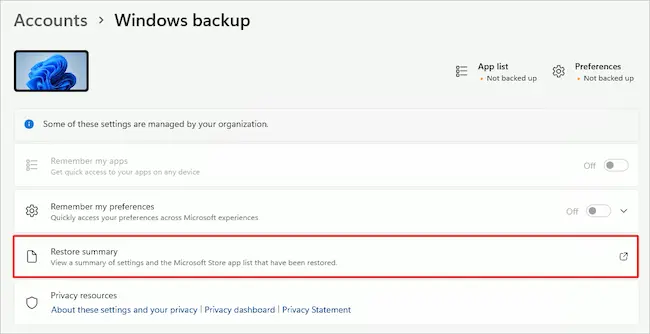
Available starting with Windows 11, version 24H2, the restore summary shows the restored personalization settings and the Microsoft Store app list. Users can reach it through a notification on the new device or by going to Settings > Accounts > Windows backup. The summary opens in a browser and offers an export option. It becomes available about an hour after a successful restore and remains accessible for seven days after device setup.
Source: Microsoft
Tools for administrators
Microsoft provides the WindowsBackupAdmin PowerShell module to help administrators manage backup profiles. Administrators with the appropriate permissions can view profile attributes, export backup information for governance, and delete a user’s backup data or profiles. The module gives administrators access to profile information only.
The scripts wrap existing Microsoft Graph beta APIs and are available through the PowerShell Gallery and GitHub.
Tested inside Microsoft
Microsoft says it has deployed backup policies across its own organization. Brian Fielder, Vice President of Microsoft Digital, said the feature helps “free IT teams from the heavy lifting of device reimaging.”
Shilpa Narang, Senior Product Manager at Microsoft, described the goal as helping employees pick up where they left off on a new PC while making device transitions easier for administrators.