
Android 17 tweaks location privacy with one-time access
Google introduced a suite of location privacy features in Android 17 Beta 3 to give users more control and provide developers with tools for data minimization and product safety.
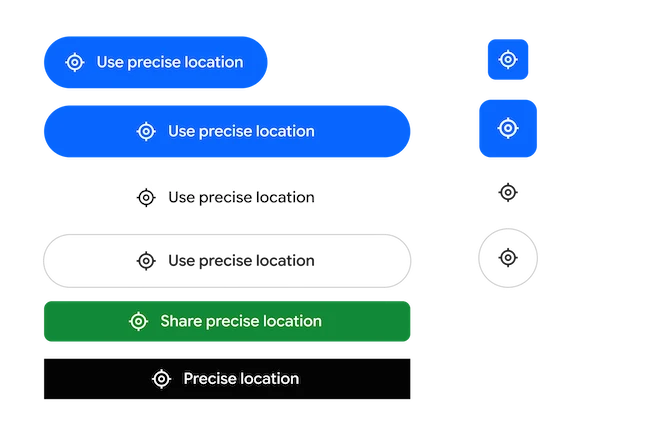
Location button overview
Android 17 introduces a new UI element called the location button, designed for one-time access to precise location. This feature supports common tasks that do not require persistent or background access, such as finding nearby places or tagging content.
Users can customize location button’s background and icon color scheme, outline style and size and shape. Appropriate text label from predefined list of options is also available. To ensure security and trust, the location icon remains mandatory and non-customizable.
The location button will be provided as Jetpack library to ensure easy integration into users existing app layouts, and to simplify request permission to access precise location. Implementing location button with Jetpack library, automatically handles backwards compatibility by defaulting to existing location prompt for users of Android 16 or below.
Location data transparency
Users often struggle to understand the tools that they can use to monitor and control access to their location data. Google has updated location indicator that appears whenever a non-system app accesses users location. Users can tap it and manage permissions through “Recent app use” dialog.
“Android 17 is also improving the algorithm for approximate (coarse) locations to be aware of population density. Previously, coarse locations used a static 2 km-wide grid, which in low-population areas may not be sufficiently private since a 2km square could often contain only a handful of users. The new approach replaces this fixed grid with a dynamically-sized area based on local population density,” Robert Clifford, Developer Relations Engineer and Manjeet Rulhania, Software Engineer at Google, explained.
By making the grid bigger in less populated areas, Android keeps privacy protection consistent in both cities and remote places.
Redesigned permission dialog
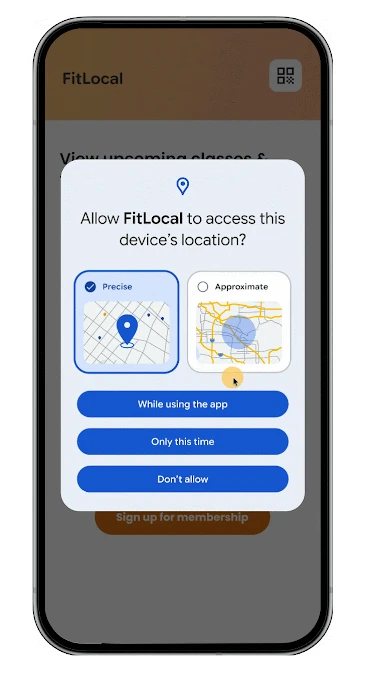
The location permission dialog is complicated for users, asking them how precise the access should be and how long each app can use it. To help users make informed privacy decisions, Google has redesigned the dialog to make “Precise” and “Approximate” choices visually distinct so they can choose the lvel of access which suits them best.
