
OpenAI’s Chronicle feature lets Codex read your screen, raising privacy concerns
OpenAI’s Chronicle is a feature designed to help Codex, an AI-powered coding assistant, better understand what users are working on by capturing context directly from their screens. It uses recent screen activity to build memories, allowing Codex to interpret references, identify relevant sources, and pick up on the tools and workflows users rely on, without requiring them to restate context in every prompt.
“In these cases, Codex uses Chronicle to provide additional context. When another source is better for the job, such as reading the specific file, Slack thread, Google Doc, dashboard, or pull request, Codex uses Chronicle to identify the source and then use that source directly,” OpenAI said.
The feature is currently available as an opt-in research preview for ChatGPT Pro subscribers in the Codex app on macOS. It requires Screen Recording and Accessibility permissions and is not yet available in the EU, UK, or Switzerland.
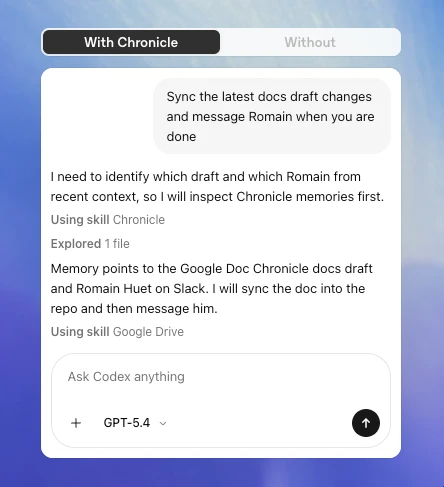
Screenshot of filling in missing context (Source: OpenAI)
Privacy and security considerations
Since Chronicle generates memories using screen context, it can be paused while working with sensitive content that you don’t want used as context.
“Chronicle uses screen captures, which can include sensitive information visible on your screen. It does not have access to your microphone or system audio. Don’t use Chronicle to record meetings or communications with others without their consent,” the company added.
The company notes that Chronicle may quickly consume rate limits and increase exposure to prompt injection attacks from on-screen content.
How Chronicle works
The system runs sandboxed agents in the background that analyze captured images. Screen captures are stored temporarily on the user’s computer, and selected frames are processed through an ephemeral Codex session on OpenAI’s servers to generate structured memories. Screen captures older than six hours are automatically deleted while the feature is active.
During processing, Codex can analyze selected frames, extract text using OCR, and incorporate timing data and local file paths associated with the active window.
The resulting memories are saved locally as unencrypted markdown files, which can be inspected or modified. When relevant, this information is included in future Codex sessions as context and may also be used to improve OpenAI’s models, depending on settings.
OpenAI says that screen captures are not retained on its servers after processing, unless required by law, and are not used for training.