
OneDrive updates focus on AI, access control, and compliance
Microsoft OneDrive’s recent updates focus on improving intelligence, collaboration, and administrative control.
“Last year, we made a promise: your files should work for you, not the other way around. That meant reimagining OneDrive not just as a place to store files, but as an intelligent layer that surfaces what matters, eliminates busy work, and enables seamless collaboration across your organization. OneDrive became smarter, more collaborative, and more central to how work flows across Microsoft 365,” Arwa Tyebkhan, Partner Group Product Manager at OneDrive, Microsoft, explained.
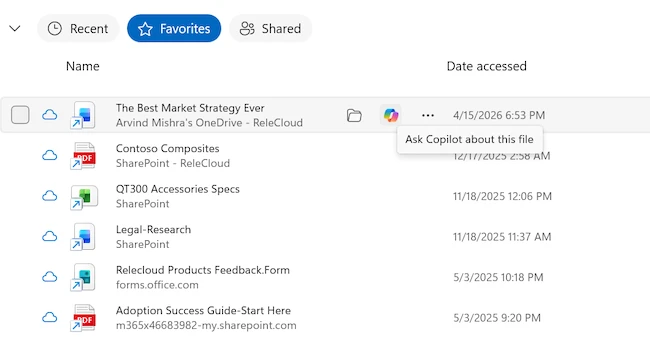
Ask Copilot in File Explorer (Source: Microsoft)
Copilot in OneDrive and SharePoint
The AI Actions button in document libraries, introduced last year, enables natural language interaction with files, supporting content discovery, information retrieval, and task execution. Updates in 2026 expand these capabilities, improving content understanding and interaction.
New enhancements also enable the generation of documents, presentations, spreadsheets, and other structured outputs from content stored in SharePoint. These features support faster information discovery, improved comprehension, and creation of new deliverables.
Copilot in OneDrive supports file summarization, question answering, and key information extraction. It can also recap recordings and extract insights from visual content such as whiteboards. Additional capabilities include working with PDFs on the web, using optical character recognition (OCR) on mobile devices, and enabling intelligent search experiences.
Content experiences and file enhancements
Markdown file support is now generally available in OneDrive and SharePoint, allowing .md files to be created, viewed, and edited directly in the browser alongside other documents. This simplifies the management of reusable content such as instructions, notes, and workflow context.
Copilot can explain selected text in PDFs in plain language and respond to custom prompts for more specific queries.
To improve content accessibility, OCR is now available in OneDrive for iOS and Android. After processing, text in images becomes selectable and can be copied, supporting information reuse and faster document workflows.
On iPad, offline search enables users to locate files that are available offline without an internet connection by searching filenames instead of manually browsing folders.
Semantic search, currently available in preview for users in the Windows Insider Program, a testing program that lets users try early, unfinished versions of Windows, on Copilot+ PCs with Microsoft 365 Copilot licenses, allows users to find files by describing what they are looking for instead of remembering exact file names. This applies to both locally stored and cloud-based files.
A new “Ask Copilot” option in File Explorer (in preview for Windows Insiders) provides quick AI insights on recent OneDrive files. Users can summarize content, extract key details, and generate drafts such as emails directly from File Explorer.
Access control and collaboration management
Improvements to sharing and collaboration give users more control over access and permissions. Hero Link, which manages file access, will be updated this summer to support more flexible sharing options.
Transfer ownership capabilities will allow managers to filter files by shared status, move content while preserving permissions, and take action after an employee leaves the organization using updated notifications.
SharePoint document libraries also include enhancements such as custom views, improved filters, and a streamlined command bar that brings commonly used actions closer to users.
Client synchronization and scalability
To support up to 1 million items on Windows devices and help teams manage large document libraries and shared content without compromising access across devices, OneDrive Sync is becoming available in public preview. This preview requires the OneDrive Insiders ring, additional hardware requirements, and recommended configuration settings.
The hardware requirements include running Windows 11 or Windows Server 2022 (or a newer version). The system should have at least 16 GB of RAM, although 32 GB is preferred for better performance. Storage should be on an SSD, and the processor should be an Intel i5, Ryzen 5, or better, including options like the Snapdragon X Plus.
IT administrators can set a custom name for the local OneDrive sync root folder on users’ devices to reduce file path length issues. This policy allows organizations to define a shorter, organization-specific folder name.
Data management and governance
The public preview of file-level archiving in Microsoft 365 Archive allows organizations to archive individual files in active SharePoint sites, moving inactive content to lower-cost storage without disrupting the site.
A new admin policy for expiring “People in your organization” links helps ensure that shared access is time-bound and aligned with data governance requirements.
Apple platform client enhancements
On macOS, OneDrive Sync now features a redesigned Activity Center and updated dialogs that feel native to the Mac environment. A simplified layout shows essential information first, with more detail available when needed.
The new file previewer in OneDrive for iOS allows users to preview files within the app without downloading them, while maintaining Microsoft 365 security and compliance standards.
Folders can also be moved to OneDrive directly from File Explorer while preserving their structure, simplifying backup of large file sets.
