
Hardcoded MCP credentials found in public GitHub files
Hardcoded API keys, access tokens and other credentials used by AI coding tools have been found in publicly accessible MCP configuration files on GitHub, according to research from Hush Security’s The State of MCP Configuration: The Identity Security Gaps report.
The company analyzed around 82,000 configuration files and found that 12% of credential slots contained a hardcoded credential literal, potentially exposing credentials for connected services and systems.
How the exposed credentials were identified
Researchers searched public GitHub repositories for configuration filenames used by major coding agents. They examined environment values and authentication headers, classifying credential slots according to how authentication information was stored.
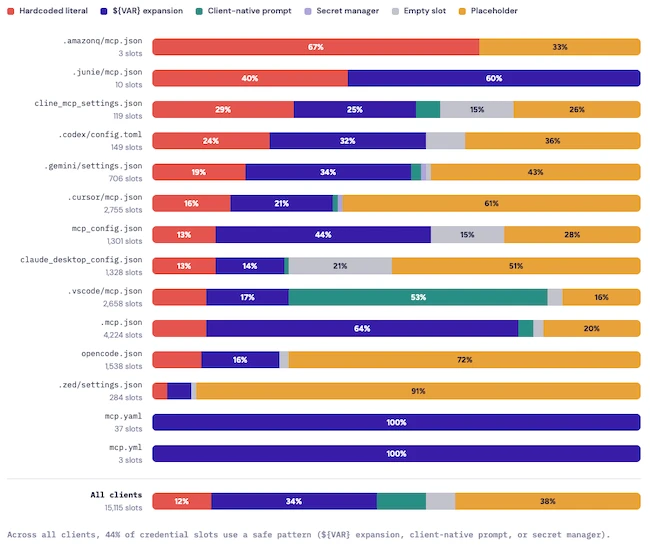
How each credential slot gets its value (Source: Hush Security)
The categories included hardcoded values, environment-variable references, client-managed prompts, secret-manager references, placeholders and empty fields. Researchers identified likely secrets in hardcoded values using provider-specific patterns and Shannon entropy, which measures randomness.
GitHub code search indexes default branches, excludes forks and limits results for individual queries. Hush therefore treats the reported figures as lower-bound estimates rather than a precise count of exposed credentials.
Several files included in the study were general configuration files that can optionally contain MCP settings. In those cases, researchers counted only sampled files that declared an MCP server. They did not attempt to authenticate with any services using the discovered values.
Some credentials may have been revoked or rotated since they were committed. Of the hardcoded secrets, 55% had no vendor-recognizable token format, including 31% classified as opaque bearer tokens for internal MCP servers.
For values without a recognizable provider-specific format, researchers used key names, length, entropy and character patterns to assess whether they were likely to be credentials. Their analysis found that these values consisted predominantly of vendor API keys, bearer tokens and database passwords, with non-secret identifiers accounting for a negligible share.
No raw secret values were retained. The findings were aggregated and anonymized to prevent individual repositories or authors from being identified.
Deleted secrets can remain in Git history
Removing sensitive information from the latest version of a file may not eliminate it from a repository. Git retains previous versions, leaving deleted values accessible through commit history.
Researchers examined the history of 7,681 credential-bearing configurations, looking through up to seven revisions before the current version. They identified 243 configurations in which a secret had been removed from the current file but remained in an earlier commit.
Rotating the affected credential at the provider is necessary to end the exposure because deleting it from the current configuration does not remove it from Git history.
“The instinct every security team has trained for years – to scan for secrets, block the commit, and rotate what leaked – isn’t nearly enough here,” said Micha Rave, CEO of Hush Security. “These files are meant to be committed; the secret never should be. When it is, the highest-risk credentials in them match no known pattern, and the identities behind them have no owner and no expiry. That’s a whole population of access tokens sitting out in public Git with no one watching.”
Of the hardcoded credential literals, 24% were of types that are both broad-scope and non-expiring by design.
53% of credentials with a classified scope provided organization-, account-, workspace- or database-wide access. For credentials with a defined expiration policy, 80% did not expire by default.
Long-lived credentials with extensive permissions can increase the impact of exposure because a single credential may provide access to multiple resources or sensitive functions.
MCP adds to the machine identity problem
MCP connections can give AI agents permission to interact with source code, databases, cloud infrastructure and other services on behalf of users or organizations.
These agents operate as non-human identities, using credentials to authenticate with systems without requiring a person to sign in for each interaction. As their use grows, organizations need to track which agents have access, what permissions they hold, who is responsible for them and when that access should end.
