
Fake browser crash alerts turn Chrome extension into enterprise backdoor
Browser extensions are a high-risk attack vector for enterprises, allowing threat actors to bypass traditional security controls and gain a foothold on corporate endpoints.
Case in point: A recently identified malicious extension called NexShield proves that a single user install from an official and nominally safe online marketplace can escalate into full remote access.
Huntress researchers found that it downloads a previously undocumented Windows remote access trojan (RAT) onto domain-joined machines, which are “typically corporate endpoints with access to Active Directory, internal resources, and sensitive data.”
The extension was pushed onto users looking for an ad blocker via Google Search.
Victims were lured by promises of “a safer browsing experience” to a professional-looking download page, which claimed that the “NexShield Smart Ad Blocker” was created by Raymond Hill, the legitimate developer of the popular uBlock Origin ad blocker.
They were then redirected to the Chrome Web Store, where the NexShield extension was available for download for users of all Chromium-based browsers (it has since been removed).
The researchers found that the NexShield extension is almost entirely a clone of uBlock Origin Lite, but has been modified to let the developer track installation, update, and removal events, while obscuring its malicious behavior by delaying execution for an hour after installation.
The extension tricks the user into installing and executing the ModeloRAT by essentially overwhelming the browser with requests and “freezing” it. When the victim force-quits their browser and tries to open it again, NexShield displays a fake security warning through a pop-up window:
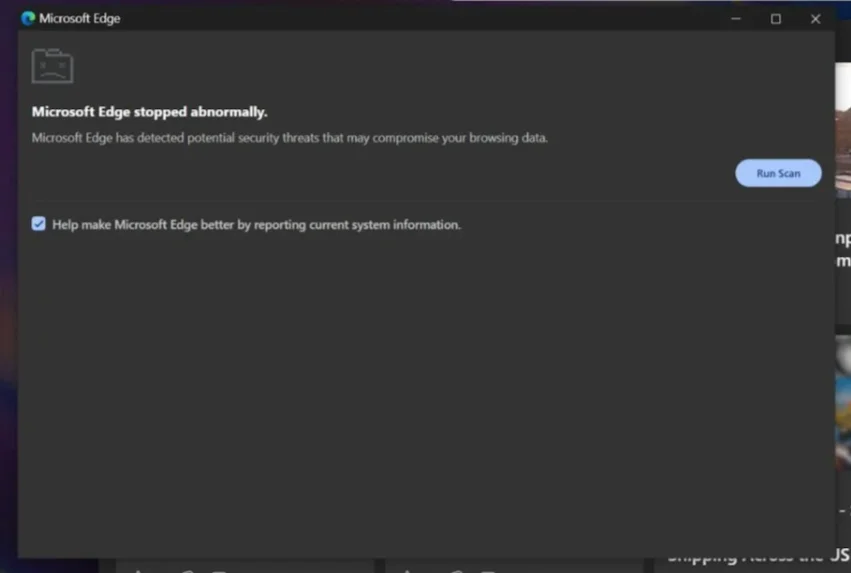
The fake “CrashFix” pop-up message (Source: Huntress)
“Upon ‘running the scan’, the user is presented with a fake ‘Security issues detected’ alert and instructed to manually ‘fix’ the issue by opening the Windows Run dialog (Win + R), pasting from their clipboard (Ctrl + V), and pressing Enter. The malicious extension silently copies a PowerShell command to the clipboard, disguised as a legitimate repair command. When the user follows these steps, they unknowingly execute the malicious command,” the researchers explained.
“If the user closes the popup without removing the extension, the next 10-minute timer triggers another DoS. The cycle repeats until the user either falls for the social engineering or removes the extension.”
The PowerShell command downloads finger.exe, a legitimate Windows utility, which is used by the attackers to retrieve information about the system and to download and execute payloads from their server.
More PowerShell scripts are downloaded and used to check for the presence of analysis tools, VM indicators, and if the machine is domain-joined or standalone. If it’s the former, the script will download a Python environment and the persistent ModeloRAT.
“This targeting distinction suggests [the threat actor] prioritizes enterprise environments where a single compromised host can provide lateral movement opportunities, credential harvesting, and access to higher-value assets,” the researchers noted.
The malicious extensions have since been reported and removed from the Chrome Web Store.
Enterprise platforms in the crosshairs
Socket’s threat researchers also identified five malicious Chrome extensions targeting enterprise human resources (HR) and enterprise resource planning (ERP) platforms such as Workday, NetSuite, and SAP SuccessFactors.
Offered for download on Google’s Chrome Web Store, the extensions – DataByCloud 1, DataByCloud 2, DataByCloud Access, Software Access, and Tool Access 11 – impersonated productivity tools for those platforms and have been collectively downloaded by 2,300 users.
“The extensions target the same enterprise platforms and share identical security tool detection lists, API endpoint patterns, and code structures, indicating a coordinated operation despite appearing as separate publishers,” Socket researchers noted.
The extensions are constantly exfitrating authentication cookies to remote servers and allow attackers to take over accounts by hijacking sessions via cookie injection. They also block access to security administration pages (e.g., for changing passwords, managing 2FA, configuring security policies, etc.)
“The blocking extensions create a containment failure scenario. Security teams can identify suspicious activity through SIEM alerts, login anomalies, or user reports, but every standard remediation action is blocked. Organizations face a choice between allowing continued unauthorized access or migrating affected users to entirely new accounts outside the compromised environment, a process that disrupts business operations and requires manual intervention at scale,” the researchers explained.
Advice for enterprise admins
Enterprise admins can significantly reduce the risk of malicious or risky browser extensions by combining technical controls, policy enforcement, and monitoring.
They can:
- Prevent employees from downloading unapproved extensions by using allowlists
- Thoroughly review extensions before adding them to the allowlist
- Disable Developer Mode on browsers to prevent users from loading unpacked or sideloaded extensions
- Monitor installed extensions (because even approved extensions can turn malicious after updates).

Subscribe to our breaking news e-mail alert to never miss out on the latest breaches, vulnerabilities and cybersecurity threats. Subscribe here!