
ChatGPT gets new security feature to fight prompt injection attacks
OpenAI has introduced Lockdown Mode and Elevated Risk labels in ChatGPT to help users and organizations reduce the risk of prompt injection attacks and other advanced security threats, particularly when using features that interact with external systems.
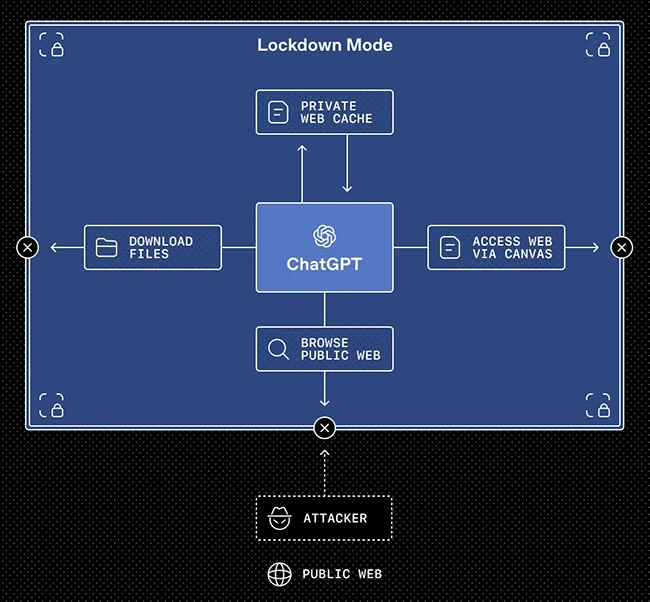
Limiting tool access to prevent data exfiltration
Lockdown Mode in ChatGPT is an optional, advanced security setting for highly security-conscious users who require protection against advanced threats. To reduce the risk of prompt injection–based data exfiltration, it constrains how ChatGPT can interact with external systems by deterministically disabling certain tools and capabilities that an attacker could attempt to exploit through users’ conversations or connected apps.
For example, to prevent sensitive data being exfiltrated to an attacker through web browsing, no live network requests leave OpenAI’s controlled network, and browsing is limited to cached content.
Admins can enable Lockdown Mode through Workspace Settings by creating a dedicated role that adds security restrictions on top of existing administrative controls. They can also choose which apps and actions are available to users operating in Lockdown Mode.
Lockdown Mode is available for ChatGPT Enterprise, ChatGPT Edu, ChatGPT for Healthcare, and ChatGPT for Teachers, with plans to expand availability to consumer users in the future.
In-product security warnings
Elevated Risk labels provide in-product guidance for features that may introduce additional security risk when connecting AI products with apps and the web, helping users understand what changes and risks are involved so they can make informed decisions.
Elevated Risk labels apply to features across ChatGPT, ChatGPT Atlas, and Codex. They explain what a feature does, what changes when it is enabled, what risks may be introduced, and when its use is appropriate.
In Codex, for example, granting network access allows the system to take actions on the web. When enabled, an Elevated Risk label highlights the security implications of this access so developers can better understand the trade-offs involved.
“We continue to invest in strengthening our safety and security safeguards, especially for novel, emerging, or growing risks. As we strengthen the safeguards for these features, we will remove the “Elevated Risk” label once we determine that security advances have sufficiently mitigated those risks for general use. We will also continue to update which features carry this label over time to best communicate risk to users,” the company said.