
Plumber: Open-source scanner of GitLab CI/CD pipelines for compliance gaps
GitLab CI/CD pipelines often accumulate configuration decisions that drift from security baselines over time. Container images get pinned to mutable tags, branches lose protection settings, and required templates go missing. An open-source tool called Plumber automates the detection of those conditions by scanning pipeline configuration and repository settings directly.
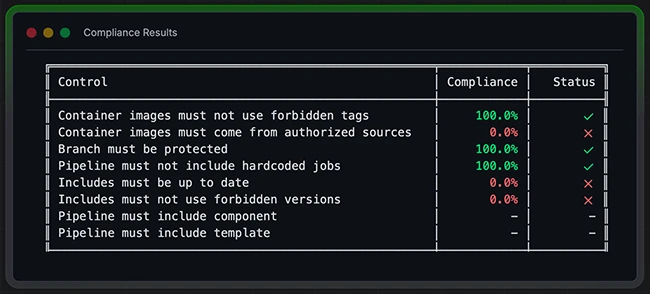
What Plumber checks
Plumber reads a project’s .gitlab-ci.yml file and queries the GitLab API to produce a compliance report. It includes eight controls that teams can enable, disable, or configure through a .plumber.yaml file in their repository.
The controls cover container image tags (flagging mutable references like latest, dev, main, and master), container image registries (confirming images come from sources defined as trusted in the configuration), and branch protection (checking whether critical branches enforce minimum access levels and block force pushes).
Additional controls verify that pipeline jobs come from includes or components rather than being defined directly in the CI file, that included templates and components are up to date, that version references for includes do not use mutable identifiers, and that required components or templates are present.
The tool connects to a GitLab instance via the API using a personal access token. The token requires read_api and read_repository scopes and must belong to a user with Maintainer-level access or higher on the project being scanned.
Two deployment paths
Plumber can run as a standalone command-line binary or as a GitLab CI component added directly to a pipeline. The CLI path suits local testing or one-off scans. The CI component path runs automatically on every pipeline execution against the default branch, tags, and open merge requests.
Adding Plumber as a CI component requires two lines in a .gitlab-ci.yml file and a GITLAB_TOKEN variable configured in the project’s CI/CD settings. A configurable threshold (defaulting to 100 percent) determines whether the job passes or fails. Teams can lower the threshold during adoption and tighten it over time.
Output appears as a colorized terminal report and optionally as a JSON file suitable for audit records or downstream tooling.
Installation and availability
Plumber is written in Go and released under the Mozilla Public License 2.0. Binaries are available for Linux, macOS, and Windows. Installation is supported via Homebrew, Mise, direct binary download, and Docker. Building from source requires Go 1.24 or later.
Organizations running self-hosted GitLab instances can import the Plumber repository into their own infrastructure and publish it as a CI/CD catalog resource for internal use.
Plumber is available for free on GitHub.

Must read:
- 40 open-source tools redefining how security teams secure the stack
- Firmware scanning time, cost, and where teams run EMBA

Subscribe to the Help Net Security ad-free monthly newsletter to stay informed on the essential open-source cybersecurity tools. Subscribe here!