
EvilTokens ramps up device code phishing targeting Microsoft 365 users
Security researchers report a notable increase in device code phishing activity aimed at Microsoft 365 users, and have attributed this rise to the availability of EvilTokens, a new, specialized phishing toolkit that’s being offered as-a-service via Telegram.
What is device code phishing?
Device code phishing is a type of attack where attackers trick users into logging into their account by using a real authentication flow, then steal their access and refresh tokens.
Microsoft provides the Device Code Authentication workflow to help users to “sign in to input-constrained devices such as a smart TV, IoT device, or a printer.”
Legitimate use of this workflow involves users asking for a short authentication code, which they will enter into a special Microsoft login page, and their device will get access.

Phishers misuse this workflow by initiating a genuine device authorization request, then sending to the targeted user the special login code and link provided by Microsoft in response to that request.
The success of this last step hinges on them providing a convincing explanation of why the user should follow the link (either “normal” or in QR code form).
If the target does it, it will ultimately direct them to the Microsoft Device Code Authentication page, and if they enter the login code provided by the phisher, they will complete the authentication flow.
This will allow the attacker to retrieve a valid access and refresh token by requesting it from the /
The phisher can then use those tokens to establish long-term, continuous access to the compromised account, without having to know the user’s login credentials or needing to bypass multi-factor authentication requirements.
“In more advanced post-compromise scenarios, the attacker can leverage the harvested refresh token to register an additional device in Entra ID, then use the token together with the new device identity to request a [Primary Refresh Token],” Sekoia researchers noted.
“Once a PRT is obtained, the threat actor can silently authenticate as the victim to the organisation’s Microsoft 365 applications, bypassing credential prompts and MFA, and move laterally to other services and resources beyond those originally targeted.”
The EvilTokens PhaaS
The EvilTokens phishing kit is sold on Telegram and provides low-skill attackers with decoy phishing pages with appropriate lures and instructions (either hosted by themselves or the EvilTokens administrator), automates all interactions with Microsoft API, sends emails from outwardly trusted senders, creates convincing phishing emails (via LLMs), and more.
EvilTokens’ phishing templates include email quarantine notices, calendar invites, SharePoint access requests, password expiry warnings, DocuSign and Adobe Acrobat Sign requests, notification for shared documents on OneDrive, and eFax notifications.
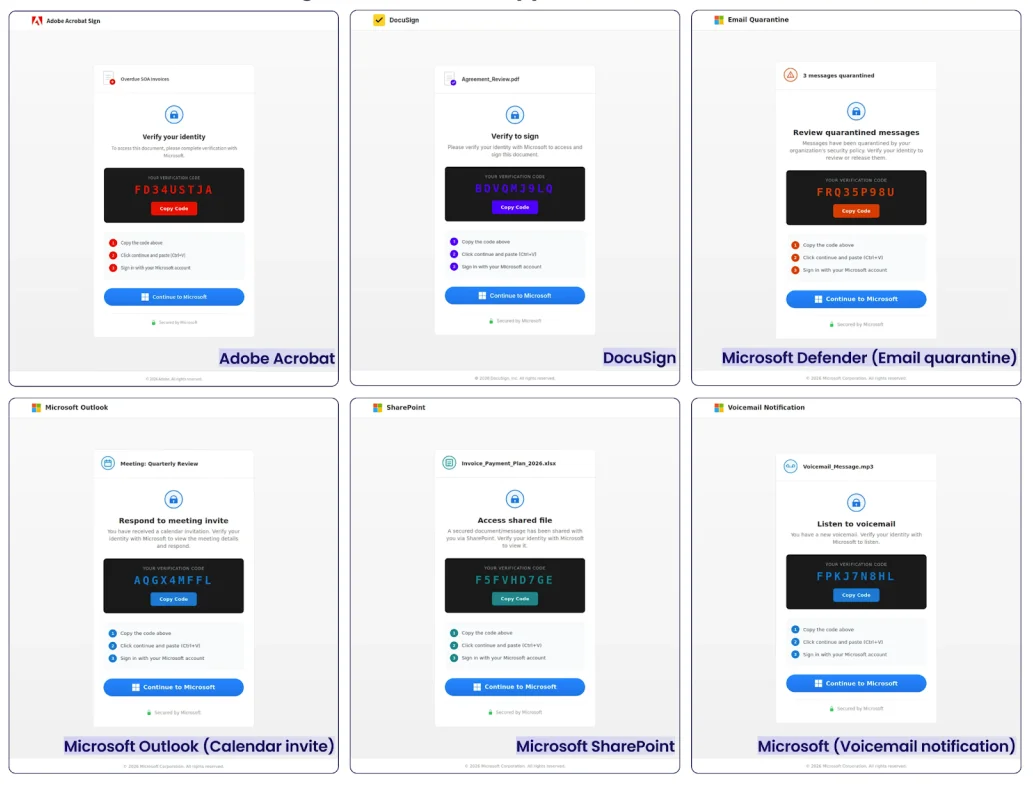
EvilTokens’ phishing templates (Source: Sekoia)
“The platform is also designed to help operators prioritise what to do after access is obtained. Features such as AI Analysis and Keyword Scanner suggest support for reviewing compromised mailbox content, with likely emphasis on finance-related material and other high-value conversations,” Mnemonic researchers pointed out.
“That points to a service built not just for initial access, but for faster post-compromise triage and more efficient targeting once tokens have been captured.”
Documented phishing campaigns powered by EvilTokens seem to primarily target employees in finance, HR, transportation/logistics.
From niche tactic to growing threat
Device code phishing is not a new type of phishing attack: it has been leveraged by various threat actors in the last year or so.
But most popular phishing kits out there still rely on adversary-in-the-middle techniques to target platforms like Microsoft 365 and Google Workspace. According to Sekoia, EvilTokens is the only one that offers built-in device code phishing along with tools for account takeover and post-compromise activity.
Judging by the noticeable uptick of device code phishing campaigns, phishers and BEC scammers have embraced it.
Aside from training employees to be wary of unexpected login/code requests and making them aware what Microsoft device authorization is and what access it grants, organizations can use Conditional Access policies to block device code authentication where possible or limit the capability to approved users, devices, or locations.
They should also look for anomalous sign-ins from infrastructure linked to known campaigns or kits, and revoke refresh tokens where compromise is suspected, Mnemonic researchers advised.

Subscribe to our breaking news e-mail alert to never miss out on the latest breaches, vulnerabilities and cybersecurity threats. Subscribe here!