
Windows is getting stronger RDP file protections to fight phishing attacks
Microsoft has introduced new Windows protections starting with the April 2026 security update to reduce phishing attacks that abuse Remote Desktop (.rdp) files.
With these updates, the Remote Desktop Connection app displays stronger warning dialogs before a connection is established, shows details about the remote system, and requires users to review any request to share local resources such as drives or the clipboard.
RDP files define how a system connects to a remote computer and can be configured to share local resources such as the clipboard, disk drives, or camera.
Attackers exploit this feature by distributing RDP files through phishing emails. When opened, the file can connect to a server controlled by an attacker and expose local data, including files, stored credentials, and other sensitive information.
How the new Remote Desktop warnings work
Once the update is installed, Windows displays a one-time educational prompt the first time a user opens an RDP file, outlining how these files work and warning about phishing risks.
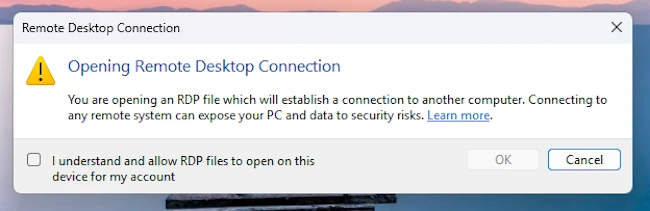
“After you allow RDP file connections in this dialog, it doesn’t appear again for your account,” Microsoft wrote.
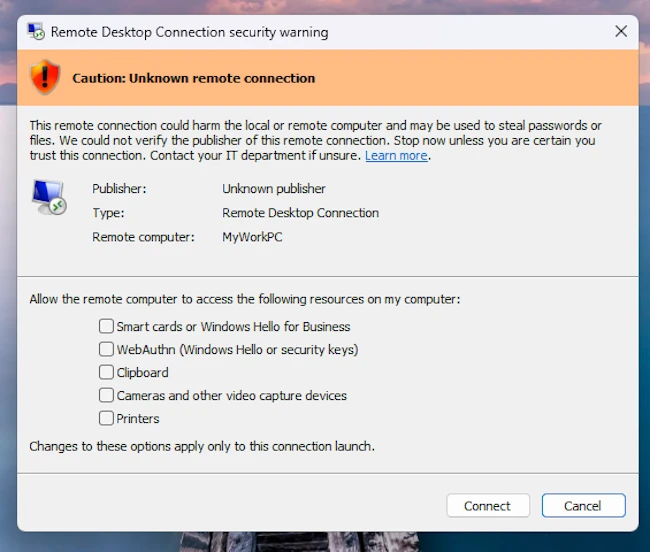
Each time an RDP file is opened, Windows displays a security prompt before any connection is made, showing the destination system and listing all requested access to local resources. These options are disabled by default and must be manually approved by the user.
If an RDP file is not digitally signed, Windows cannot verify its origin or integrity and displays a warning dialog labeled “Caution: Unknown remote connection,” with the publisher listed as “Unknown publisher.”
When an RDP file is digitally signed, Windows can verify its origin, displaying the publisher’s name in the warning dialog along with a banner titled “Verify the publisher of this remote connection.”
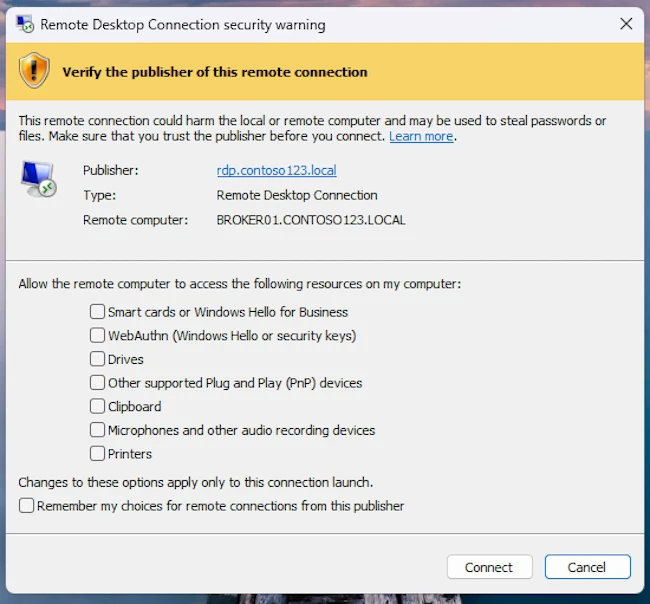
A digital signature verifies the identity of the entity that created the file and confirms it has not been altered since it was signed. However, a signature does not guarantee a file is safe, as attackers can sign files using names that closely resemble legitimate organizations, the company warned.
Microsoft added that future Windows updates may remove support for older connection settings and advised organizations to transition to the new security dialog.
