
Phishing hides in routine Microsoft 365 workflows
Attackers are abusing Outlook Groups and Microsoft 365 collaboration features to make phishing campaigns appear routine, according to Fortra.
“The technique shifts malicious intent away from a single phishing email into a trusted productivity workflow. A user may see what looks like a normal group addition, internal update, shared resource, or calendar item before being pushed toward an action,” said Daud Jawad, Security Engineer on Fortra’s Intelligence & Threat Management team.
The attack begins when a target is added to or invited into an attacker-controlled Microsoft 365 Group. The group’s name, description, or welcome message is designed to create urgency, often using themes such as payroll updates, contract renewals, supplier requests, or mandatory training notices.
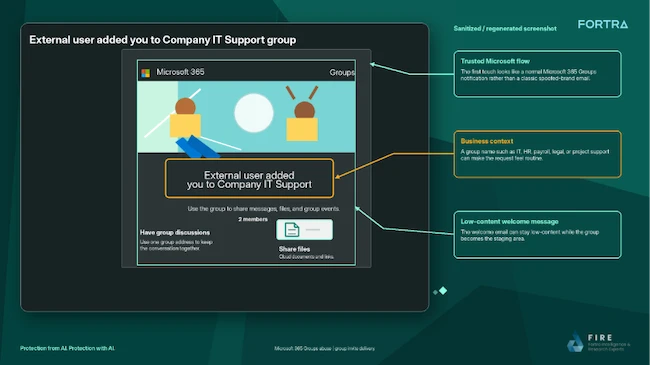
Attackers use Microsoft 365 Groups as an entry point for phishing campaigns (Source: Fortra)
Follow-up content is delivered through the group mailbox, shared files, or calendar invitations, often using one of four CalPhishing techniques. CalPhishing, short for Calendar Phishing, uses Outlook and Microsoft 365 calendar features to deliver phishing lures through meeting invitations and .ics files that can place events directly on a victim’s calendar.
Victims may be prompted to review a document, approve a request, sign in to an account, or download a file. The final action can lead to credential theft, token theft, malware delivery, data exposure, or further social engineering activity.
Fortra said the value of CalPhishing lies in repeated exposure. A user might ignore the initial email, then later notice the calendar event, open the invitation, read the description, click a link, or access a referenced file. Over time, the event can start to look like an unfinished work task, while calendar reminders keep bringing it back into view.
“Shared files create another path,” added Jawad.
“A clean group email can still lead to a document containing a fake support process, QR code, credential-harvesting page, macro lure, or remote-access instruction. Because the content is reached through a Microsoft collaboration surface, the user may treat it safer than a direct attachment.”
Fortra warned that these attacks can complicate investigations because the activity is spread between email, Microsoft 365 Groups, shared files, and calendar events.
“Unexpected groups, meetings, and shared files should be treated with the same caution as unexpected emails, especially when the theme is urgent, administrative, or account related,” concluded Jawad.
