
Microsoft wants to stop unwanted bots from entering Teams meetings
A new Microsoft Teams admin policy, Manage external bots and their access to meetings, gives organizations greater visibility and control over external bots in meetings. The policy identifies bots and applies safeguards before they are admitted. Microsoft will begin retiring the existing Require verification by participants (CAPTCHA) meeting policy.
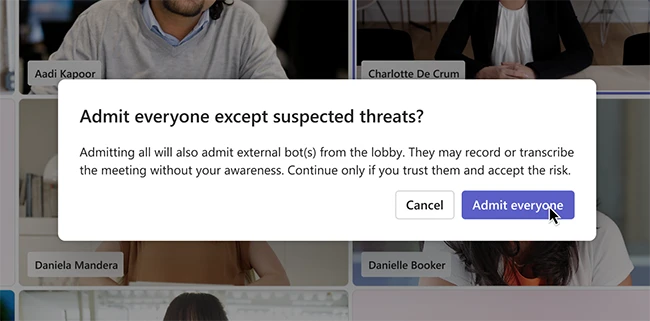
Admitting a bot should be a deliberate decision (Source: Microsoft)
Admin controls for external bots
Admins can assign the policy in the Teams Admin Center to individual users or specific groups. When enabled, the policy detects bots, places them in the lobby, identifies them, and prompts the meeting organizer to approve their admission. To prevent unintended participants from admitting unwanted users or bots, Microsoft recommends setting the Who can admit from the lobby meeting option to organizers and co-organizers.
“Even in meetings where organizers allow participants to bypass the lobby, bots identified through this policy will continue to require approval before joining,” Meera Ajam, Senior Product Marketing Manager at Microsoft, explained.
The policy also includes a Do not detect bots option.
How Teams identifies bots
Teams now uses behavioral and infrastructure signals to identify bots more accurately. Microsoft will introduce the Teams Bot Identification Program, allowing independent software vendors (ISVs) that build meeting experiences for Teams to register their bots.
Registered ISVs will include a self-identification marker in their bots’ join requests through the Teams Bot Identification Program. When Teams recognizes the marker, it identifies the bot as a registered bot.
Microsoft said it is currently working with a limited group of ISVs to preview the capability and validate the experience before making it more widely available.
When Teams detects a bot, it displays a visual indicator to distinguish it from other participants, helping organizers make informed decisions in the lobby. The lobby groups participants into Verified participants, Standard participants, Registered bots (waiting), and Unregistered or system-identified bots (suspected threats).
The company has introduced safeguards to reduce the accidental admission of identified bots. These include removing the one-click Admit option for identified bots, displaying confirmation prompts when participants being admitted include bots, and warning organizers when they select Admit all if bots are included.
What’s next
Microsoft plans to introduce additional admin controls, including allowlists for approved bots, organization-wide policies to block external bots, admin reports and audit logs covering bot detection and presence, and more granular controls to support different security requirements.
