
AWS makes it easier to spot firewall rules that have gone quiet
AWS Network Firewall’s rule hit count capability gives security teams visibility into which stateful firewall rules are matching traffic, helping them identify unused or redundant rules and validate whether security controls are working as intended.
The capability covers stateful rules in both custom and managed rule groups, while stateless rules are not supported.
The feature is enabled by default and comes at no additional Network Firewall cost, although standard charges still apply for storing and querying log data. Rule hit counts are available in all AWS Regions where AWS Network Firewall is supported, except Middle East (UAE and Bahrain).
“With this data, you can identify and remove unused rules, accelerate incident response, and validate security control effectiveness for compliance,” the authors said.
AWS Network Firewall protects Amazon Virtual Private Clouds (VPCs) with automated, intelligence-driven network security. Customers can create granular rules to control traffic and use AWS-managed rules powered by Amazon threat intelligence to block active threats, with capabilities including geographic IP filtering, deep packet inspection, intrusion prevention, and proxy functionality.
AWS said organizations with governance policies requiring dormant rules to be removed after a defined period have lacked a mechanism to identify them. Teams responsible for compliance frameworks such as PCI DSS 4.0 and the Digital Operational Resilience Act (DORA) can struggle to provide evidence that specific controls are actively functioning.
How it works
Rule hit counts track how often stateful firewall rules match network traffic. The counter increments when a rule match generates an alert log. Rules with alert, drop, or reject actions generate these logs automatically, while rules configured with a pass action must include the alert keyword to appear in the metric.
AWS adds rule group metadata to alert logs, which the Network Firewall monitoring dashboard uses to calculate hit counts and give security teams a view of rule activity without requiring them to query the underlying logs manually.
“You can also access and analyze this data by querying those logs directly using CloudWatch Logs Insights for logs stored in CloudWatch, or Amazon Athena for logs stored in Amazon S3,” the authors continued.
The metadata is automatically included in firewall logs and can be used in custom dashboards.
Seeing which firewall rules are active
The Network Firewall dashboard includes a Top Rule Hits view showing the most frequently triggered stateful rules over a selected period, including their hit counts, share of overall activity, rule details, and last occurrence.
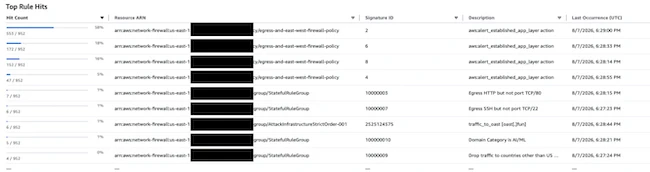
Top Rule Hits panel from the AWS Network Firewall console (Source: AWS)
Rules whose signature IDs do not appear in the metric have not matched traffic during the selected timeframe. AWS said this could indicate that a rule is stale or incorrectly ordered within its rule group.
The view can be useful during incident response. AWS gives an example of a rule detecting traffic to an out-of-band application security testing (OAST) domain, which could indicate attempted data exfiltration or an attacker validating a vulnerability. Filtering the metric to the timeframe of a suspected incident can help analysts identify relevant activity without manually parsing thousands of log entries.
AWS demonstrated how hit counts can validate recently introduced controls using rules covering AI and machine learning domains and geofencing restrictions on outbound traffic. Recorded hits showed that the rules were matching traffic as intended.
