PyPI makes release attestations easier to find with new security tab
The Python Package Index (PyPI) has added a security tab to its project pages, giving developers a place to check where individual release files came from.
How PyPI shows where release files came from
The Security tab shows whether release files have digital attestations, which provide verifiable information about how a file was published or built. A release has full provenance when every file has at least one attestation. A PyPI Publish attestation identifies the Trusted Publisher that uploaded the file, while a SLSA Build Provenance attestation links the file to its source commit, build platform and build instructions. Users can review the attestation details in the tab or open the linked transparency log.
A release has no provenance when none of its files has an attestation. Nicole Harris, PyPI design contributor, said this is common for older releases and projects that have yet to configure Trusted Publishing. She stressed that such a release isn’t necessarily malicious, since the missing attestation only means its origin can’t be cryptographically verified.
In those cases, developers can look at maintainer history, release patterns and repository activity when assessing a package.
Where PyPI shows warnings and release details
PyPI warns users when only some files in a release have attestations or when files in the same release come from different repositories or build systems. Warnings appear when a release comes from a different repository or workflow than a previous version, or when a project that previously provided attestations stops doing so.
A change in workflow often has a legitimate explanation, such as an organization renaming itself or moving its repository, though it may signal a compromised pipeline or an account takeover.
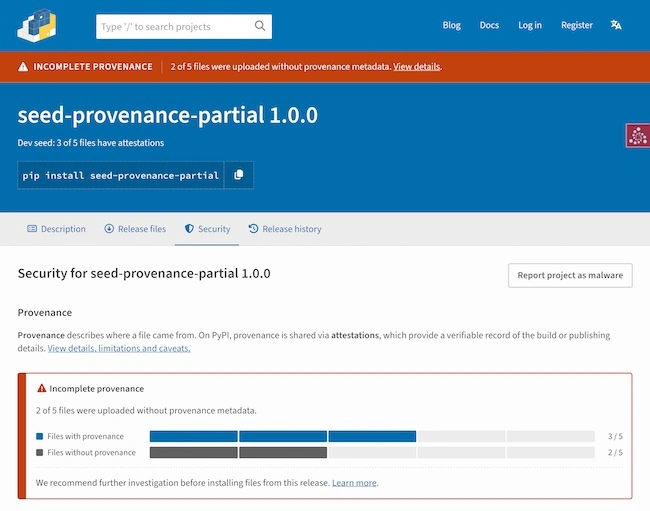
An example provenance warning on PyPI, showing a release with incomplete provenance (Source: PyPI)
The redesigned project page displays provenance warnings at the top, alongside notices for yanked releases, archived projects and pre-releases. If a project or release is quarantined, the page displays only the quarantine banner. For releases where every file is attested or a warning applies, the sidebar shows that status and links to the Security tab.
The Release Files tab lets users search and filter downloads and see the provenance status of each file. For releases that predate PyPI’s July 2026 policy change, the tab flags files uploaded more than 14 days after the initial release. Since that change, PyPI has refused any late uploads.
The Release History tab shows the file count, provenance status and any applicable release status for each version, so users can compare releases from the same page.