
Google slows Android sideloading to trip up scammers
Google’s advanced flow for Android changes how apps from unverified developers are installed, adding steps to reduce scam-driven sideloading.
The feature is aimed at experienced users and allows sideloading through a controlled, one-time setup. It addresses scam scenarios where attackers pressure individuals to install malicious software. In these cases, scammers often stay on the phone and guide victims step by step, pushing them to bypass security warnings and disable protections before they can pause or seek help.
The advanced flow adds delays and verification steps intended to disrupt coercive pressure and give users time to make decisions.
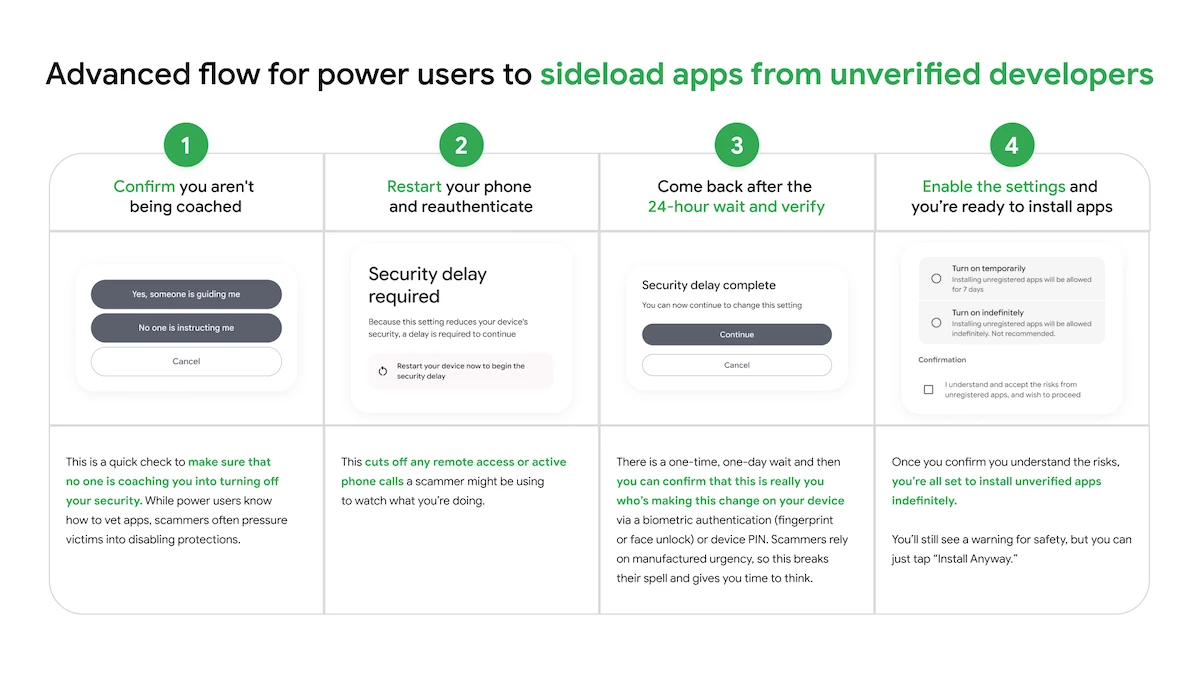
Advanced flow for power users to sideload apps from unverified developers
“We know a ‘one size fits all’ approach doesn’t work for our ecosystem. We want to ensure that identity verification isn’t a barrier to entry, so we’re providing different paths to fit specific needs,” Matthew Forsythe, Director Product Management, Android App Safety, explained.
How the advanced flow works
Start by enabling developer mode in system settings. This step requires deliberate action and reduces accidental triggers tied to scam tactics.
The system then prompts a check to confirm that no one is guiding the process. This is intended to identify situations where a caller or message is influencing the user to disable protections.
Next, restart the phone and reauthenticate. This step interrupts remote access or ongoing calls that could be used to monitor activity.
After that, wait through a one-day delay before proceeding. Once the waiting period ends, confirm the action using biometric authentication or a device PIN. The delay slows decisions driven by urgency and allows time to reconsider.
Once verification is complete, apps from unverified developers can be installed. Users can enable this access for a limited period, such as seven days, or leave it enabled without a set end. A warning appears to indicate the app’s source, with an option to continue the installation.
