
Apple expands what parents can block, approve, and limit
Apple has previewed a set of new child safety features coming to iPhone, iPad, and the Mac later this year, expanding parental controls with tools that help families manage app access, web browsing, communication, and screen time.
The features will arrive with updates to iOS 27, iPadOS 27, and macOS 27 this fall. Apple said the changes are designed to help parents create age-appropriate digital experiences and build on the company’s existing child safety tools.
“Our approach to helping families create safer digital experiences is grounded in the belief that every child is unique. That’s why we build simple and intuitive tools, based on expert guidance, to let parents tailor their kids’ digital journey,” said Sumbul Desai, M.D., Apple’s vice president of Health and Fitness.
The company said it has incorporated guidance from child development researchers, clinicians, and online safety experts into its products and services. Apple is working with the American Academy of Pediatrics (AAP) to adapt its Family Media Plan into a guide for families using Apple devices.
Child Accounts and app approvals
The first step is to create a Child Account through Family Sharing. Child Accounts are required for children under 13 and available for those up to 18 years old. During setup, a recommended set of essential apps is available, with additional apps added over time.
Ask to Buy requires approval before a child can install apps from the App Store, whether they are free or paid.
A new Ask to Browse feature for Safari will allow approval to be required before a child accesses a website for the first time on an iPhone, iPad, or Mac.
Parents can manage who their children communicate with through Messages, FaceTime, and Phone. They can also require approval before their child connects with a new contact.
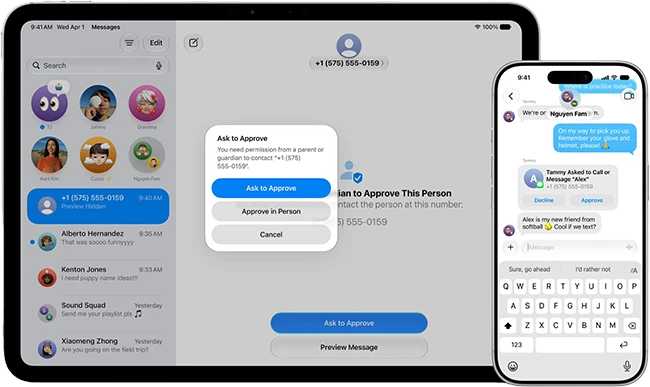
Ask to Approve (Source: Apple)
Communication Safety is enabled by default in Messages and FaceTime for users under 18. It blurs nudity when detected and, with this update, will also intervene when violent or graphic content is detected in shared images and videos.
The UK government has announced plans that would require technology companies such as Apple and Google to block children from taking, sharing, or viewing nude images on smartphones and tablets. Companies have been given three months to implement device-level protections or face legislation, fines, and potentially other penalties. Adults would still be able to access such content after verifying their age.
The proposal aims to reduce online grooming, sextortion, and children’s exposure to pornography by making nude content inaccessible on devices used by minors. The government says the measures would apply to both existing and newly sold devices in the UK.
Signal argues that the UK government’s proposal to stop children from creating, sharing, or viewing nude images would require surveillance technology that scans content on users’ devices. The company says such measures would weaken privacy and security, create risks for all users, and undermine private communications.
More control over screen time
Time Allowances provide additional ways to manage the time children spend in apps within categories such as Entertainment, Games, and Social Media. Configuration includes recommendations informed by expert research and tailored to a child’s age.
Governments are introducing age-verification requirements and social media bans to protect children online. Critics argue that such measures may encourage minors to bypass restrictions and migrate to less regulated online services.
Daily Schedules make it possible to control which apps children can access during weekdays and weekends. School-related apps can remain available during school hours, while entertainment apps can be limited to specific times and durations.
The redesigned Screen Time dashboard provides an overview of children’s average device usage and most-used apps. App access and time limits can be adjusted whenever needed.
Additional tools for parents
Apple has launched a dedicated website for parents to help them stay informed about the latest tools and features and find answers to common questions.
Features such as Screen Time Passcode Notifications, which alert families when the Screen Time passcode is entered on a child’s device, and User Reporting Tools, available in certain countries and regions, can help parents protect their children. User Reporting Tools enable users to report harmful content directly to Apple.
Apple Watch For Your Kids extends these safety features to children who do not have their own iPhone. Families can reach and locate them through Find My, while children can contact parents and approved friends through calls and messages when needed. Schooltime mode helps children stay focused during school by blocking notifications and disabling apps.
