
Claude can now sign into websites with 1Password without exposing your credentials
1Password has introduced 1Password for Claude, a beta integration that lets Anthropic’s AI assistant complete browser tasks requiring authentication without accessing users’ passwords or other secrets.
The integration is available to paid Claude subscribers (Pro, Max, Team, and Enterprise) using Claude Desktop on macOS and to 1Password customers on individual, family, and business plans. It requires a Mac, Claude Desktop, Claude in Chrome, the 1Password desktop app, and the 1Password browser extension. For Team and Enterprise plans, the integration is disabled by default and must be enabled by an organization owner.
Connecting 1Password and Claude
Users connect their 1Password account to Claude from the Connectors section in Claude Desktop. After the integration is enabled and the 1Password vault is unlocked, Claude can request credentials whenever it needs to sign in to a website while completing a task.
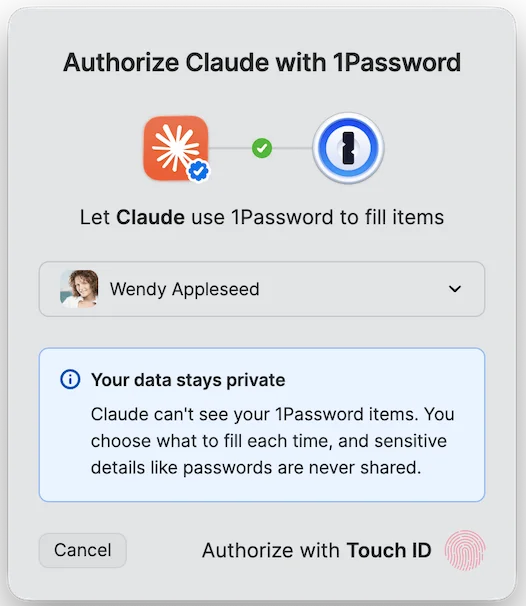
Connecting 1Password and Claude (Source: 1Password)
Signing in without exposing credentials
When Claude reaches a sign-in page, it requests the required login from 1Password. The extension shows which credential is being requested and why, allowing users to approve the request, choose a different saved login, or deny access. Approval requires Touch ID or another biometric authentication method.
Passwords, one-time passwords (TOTP), and other secrets are filled into the page through a secure channel managed by 1Password. According to the company, secret values never enter Claude’s context window, memory, or Anthropic’s infrastructure. Usernames are shared only when needed to complete a sign-in.
Access is limited to the current task. When the task ends, Claude must request permission again before using the same credential.
To give users visibility and control over browser-based AI agents, 1Password introduced Agentic Mode in its browser extension. The feature prevents agents from interacting with the extension itself and automatically activates when Claude takes control of the browser. The extension locks down, hides its interface from Claude, limits access to the credentials approved for the current task, and keeps the rest of the vault inaccessible.
After autofill, 1Password checks that secrets were not exposed on the page before returning browser control to Claude. If a sign-in attempt fails, the extension clears the autofilled values before handing control back. Agentic Mode is enabled by default and works even if 1Password for Claude isn’t configured. Users can open the 1Password extension at any time to confirm that Agentic Mode is active or cancel the current task.
“We need a new security model that is purpose-built for agents, not just humans. The answer isn’t handing agents your secrets. It is to let a user give an agent permission to use a credential without letting the agent see it. Claude knows it used your login; it does not need the password or one-time code in its context. That distinction is where trust in agents starts and the foundation we’re building with Anthropic,” Nancy Wang, CTO of 1Password, said.
According to 1Password, the integration is intended for agentic workflows such as managing online accounts, completing purchases, and other browser-based tasks that require authentication. Every request for credentials requires explicit user approval, and users can revoke access or stop an active task at any time.
Current support
At launch, 1Password for Claude supports logins and one-time passwords (TOTP). It doesn’t support payment cards, identities, or other item types.
Users experiencing setup issues should verify that Claude Desktop, Claude in Chrome, the 1Password desktop app, and the 1Password browser extension are installed, that the 1Password vault is unlocked, and that the integration is connected in Claude. Team and Enterprise customers also need an organization owner to enable the feature before it can be be used.
