
Microsoft’s workplace check-in via Wi-Fi tracks who’s in the office, and not everyone’s happy
Microsoft is rolling out workplace check-in via Wi-Fi for Teams and Microsoft Places. Connect to your office network and your in-office presence updates automatically, no manual status change needed.
Microsoft says the signal isn’t stored as location history, and that you can configure your own settings. Here’s the catch. Your employer enables the feature at the tenant level, and you only control how it’s used on your end. Privacy advocates and labor groups have already flagged that gap.
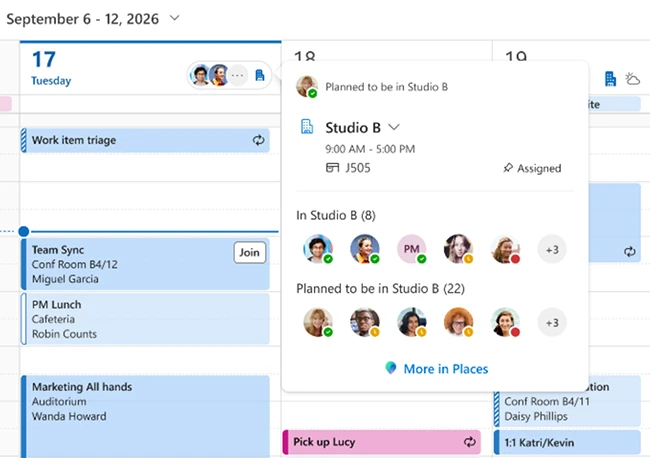
How Wi-Fi workplace check-in works
When enabled by the organization and the employee, workplace check-in via Wi-Fi can automatically update a user’s work location when their device connects to a configured workplace network. Employees can manage workplace check-in, presence sharing, and location permissions through their settings. They can also manually set or override their work location.
Microsoft says workplace presence is an in-the-moment signal that indicates where someone is working, such as in the office or remotely, and is not stored as historical data. The feature does not track or retain employees’ movements or location history. At least for now.
“It applies only to workplace contexts. The signal is generated when a device connects to configured corporate office networks through the Teams client and does not extend beyond those environments. If a device is not connected to a configured workplace network, the user’s location is shown as ‘Remote’,” Brennan McReynolds, Product Lead at Microsoft Places, explained.
Workplace check-in and presence sharing are separate decisions. In Microsoft Places, Teams, and Outlook, coworkers can see whether someone is working from the office or remotely and, in some cases, whether they are currently at a workplace. Employees can choose whether to share this information with others when working from the office.
