
Google Play is changing how Android apps access your contacts and location
Google’s new set of Google Play policy updates and account transfer feature strengthen user privacy and protect businesses from fraud. Google is also expanding features for managing new contact and location policy changes to support a smoother, more predictable app review experience.
By October, Play policy insights in Android Studio can help developers identify if their apps should use new features and will guide them on the steps to take. From October 27, new pre-review checks in the Play Console will flag potential contact or location permission policy issues so they can be fixed before the app is submitted for review.
Accessing contacts with Contact Picker
Android Contact Picker is the new standard for accessing contact information that lets users share only the specific contacts they want to.
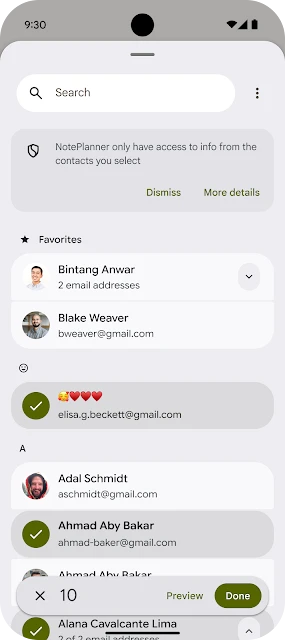
“Alongside this tool, we are updating our policy to require that all applicable apps use the picker, or other privacy-focused alternatives like Sharesheet, as the primary way to access users’ contacts. READ_CONTACTS will be reserved for apps that can’t function without it,” Bennet Manuel, Group Product Manager, App & Ecosystem Trust, explained.
Apps that request access to contacts for features like sharing or inviting should update their code to use the picker and remove the READ_CONTACTS permission when targeting Android 17 and above.
Apps that require ongoing access to a user’s contact list must submit a Play Developer Declaration in the Play Console to justify the need.
Location button for precise location
To make requesting precise location data easier for one-time actions, like finding a store or tagging a photo, Android is introducing a streamlined location button. It helps users choose how much information they share and for how long. Updated policy requires apps to use this button for one-time precise location access. Apps that require always-on location access can continue to request it.
To ensure that they are requesting the minimum amount of location data needed for the app to work, developers should review their apps’ location usage. They should add the onlyForLocationButton flag in their manifest if the app uses precise location for temporary actions and targets Android 17 and above.
If an app requires persistent precise location to function, a Play Developer Declaration in the Play Console must be submitted.
Account transfers in Play Console
Play Console gets an official account transfer feature that supports ownership transfers during sales and mergers while protecting businesses from fraud. This feature must be used from May 27. Unofficial transfers such as sharing login credentials or buying and selling accounts on third-party marketplaces are not permitted.
Through the “Users and permissions” page in the Play Console, developers should initiate any future account owner changes. Every transfer includes a mandatory 7-day security cool-down period to give teams time to spot and cancel any unauthorized account takeover attempts.
